Here are some of the reasons why this tool stands tall.
The Regain Mailbird to Outlook Converter is a tool that not only exports Mailbird emails to Outlook PST but also supports exporting emails to other formats like EML, MSG, MBOX, PDF, HTML, and MHTML formats.
During the conversion process, the Regain Mailbird to Outlook Converter preserves all email properties, including attachments, metadata, and folder hierarchy. This ensures that the original structure and information remain unchanged.
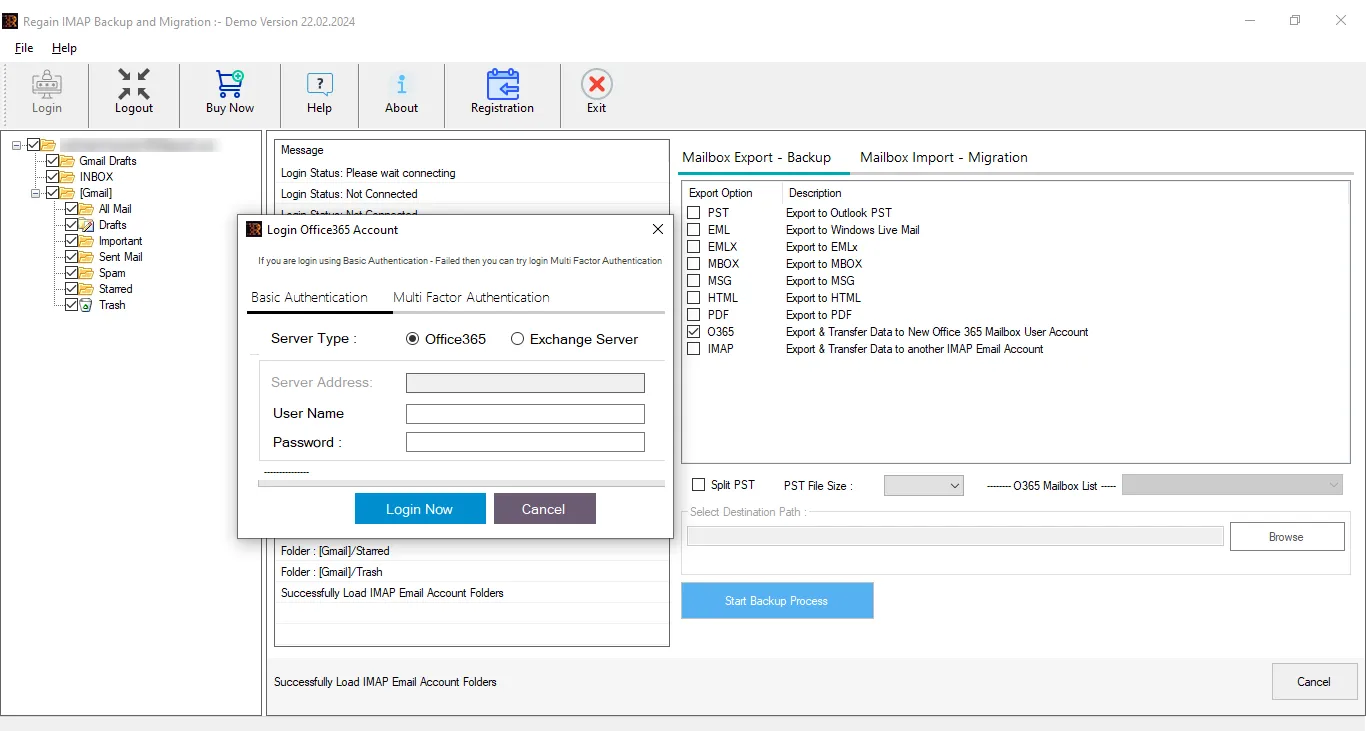
Users can easily import the converted data into popular email services like Gmail, Yahoo!Mail, Zoho Mail, GoDaddy, and other supported platforms. This helps in smoothly migrating Mailbird data to cloud-based email accounts. Moreover, it can directly migrate to Micrososft 365 and Exchange On-Premises mailbox.
Backup and Export Mailbird Mailbox Data to Various Targets.
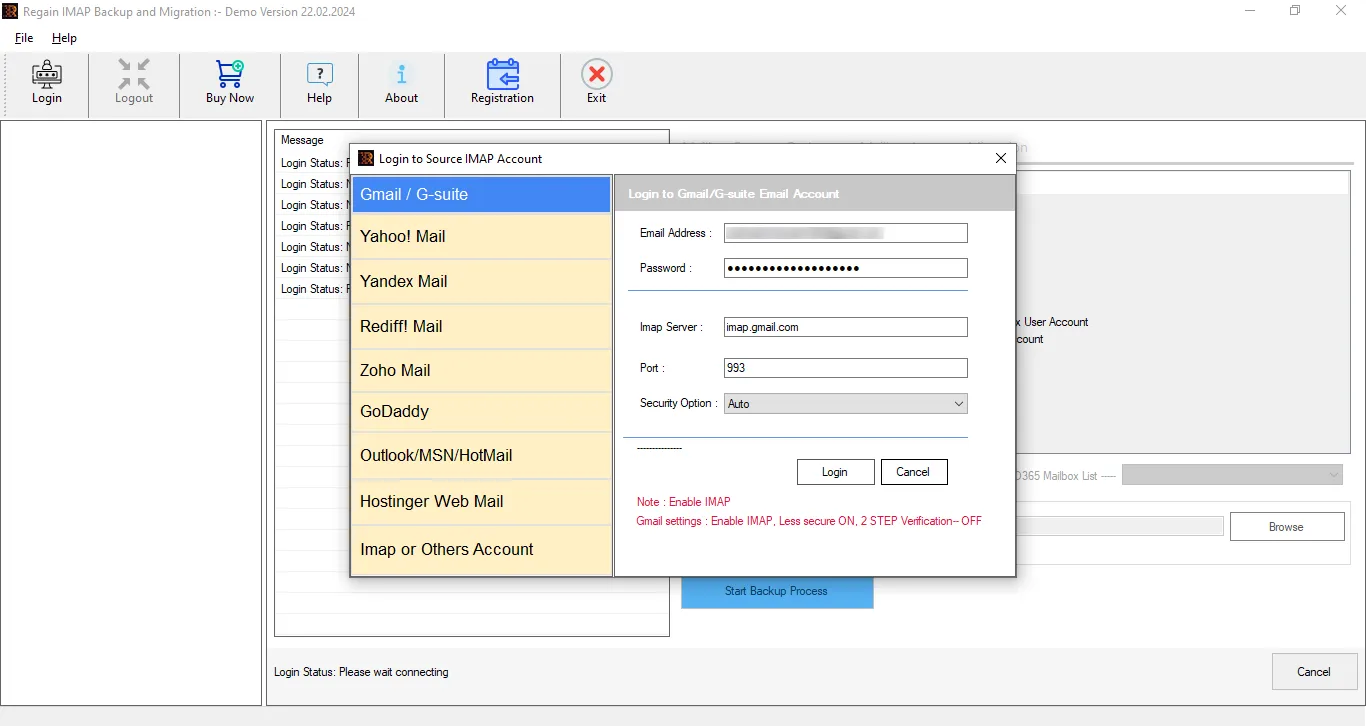
Connect Mailbird Mailbox
Process Regain Mailbird to Outlook Converter
Save Mailbird Emails in PST
File Formats- PST, EML, EMLX, MBOX, MSG, EMLX, PDF, and many more.
Email Clients- Gmail/Google Workspace, Office 365, Exchange Server (On-Premises), Yahoo, Zoho, Amazon WorkMail, GoDaddy, and all IMAP accounts.
Download and open the Regain Mailbird to Outlook Converter/Regain IMAP Backup and Migration Tool, and then, by entering login credentials, add the Mailbird mailbox into the software.
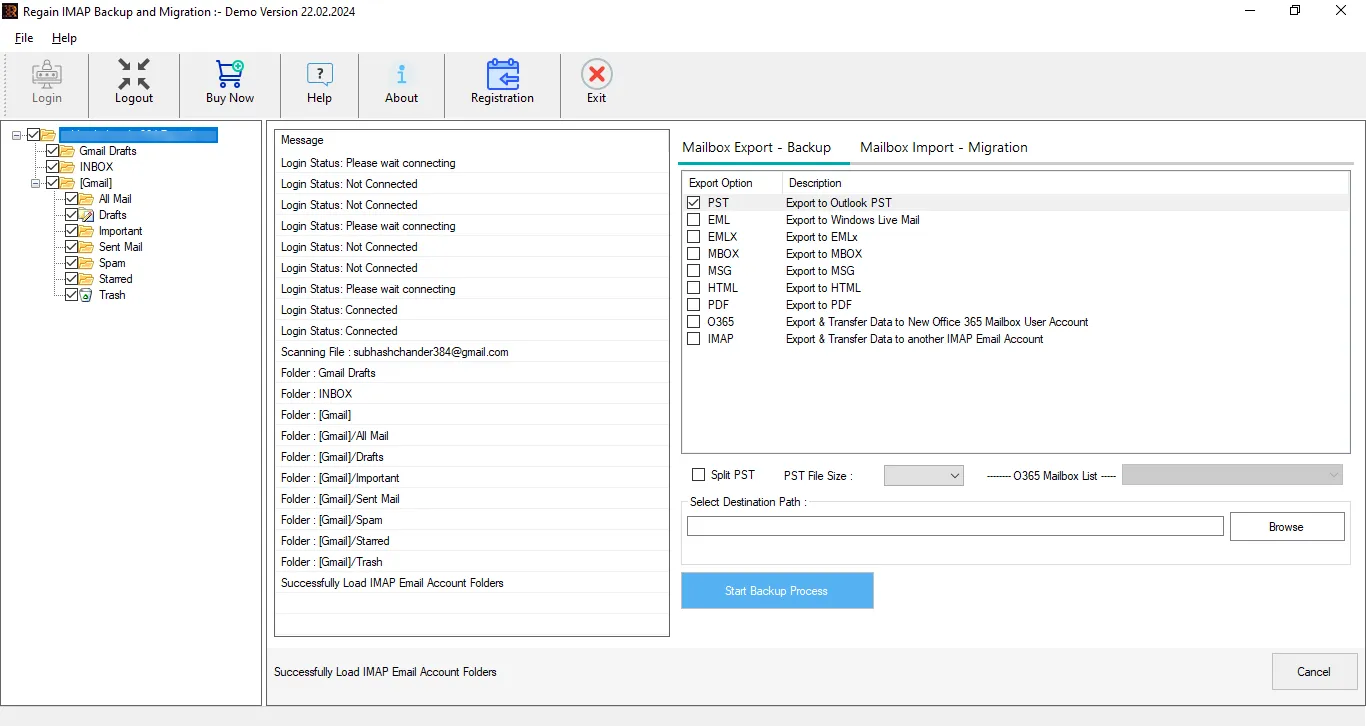
Preview the emails and select the folders or emails you want to convert.
Select PST as the target file format, choose the destination location, and click Start Backup process.


Ensure to review the technical specifications and prerequisites before installing the Regain Mailbird Converter software.
System Requirements
Version Supports
Have a look on the facilities offered by this advanced tool developed by the Regain Software.
The tool allows users to export Mailbird emails into multiple file formats such as PST, EML, MSG, MBOX, HTML, MHTML and PDF. This feature helps users create secure backups and access their emails across different platforms. Moreover, users can set the size for the resultant PST files.
Regain Mailbird to PST Converter software enables users to migrate Mailbird emails directly to IMAP-supported email services. This makes it easy to transfer data to platforms like Gmail, Yahoo Mail, Zoho Mail, and any other IMAP-enabled accounts. Moreover, it is capable to export emails from any IMAP-enabled email platforms like Mailbird.
The tool supports bulk conversion, allowing users to convert multiple Mailbird mailbox into Outlook PST format in a single process. This feature is especially helpful for users dealing with large volumes of email data.
During the conversion process, the software preserves the original folder structure of the Mailbird mailbox. All emails remain organized exactly as they were in the original email structure. This utility is fully tested and verified.
Regain Mailbird to Outlook Converter provides a built-in preview feature that allows users to view Mailbird emails along with attachments before starting the conversion process. This helps users verify their data and ensures that only the required emails are converted.
Users have the option to select specific folders or emails for conversion. This helps in converting only important data instead of migrating the entire mailbox. Users just need to uncheck the folders to skip them.
Regain Mailbird to Outlook Converter offers a split PST facility using which users can set the size for the resultant PST file. The software will automatically split PST file on reaching the limit. This helps user to prevent PST files from being oversized.
The software is designed with a clean and easy interface so both technical and non-technical users can operate it without any difficulty. The conversion process can be completed in just a few simple steps.
Regain Mailbird to PST Converter tool is fully compatible with all Windows operating systems, including Windows 11, 10, 8, and 7. Users can install and run the software smoothly without facing compatibility issues.
Regain provides a free technical support facility to assist users if there is a need. Users can connect with support team via the live chat facility or write to [email protected]. Moreover, our agents are always ready to communicate via telephone.
Witness a recent case where this utility came in handy for an IT executive.
Case: Hello, my name is David, and I work as an IT executive in a small company. Our team was using Mailbird for daily email communication, but recently we decided to move to Microsoft Outlook for better email management. The main problem was that we had thousands of emails stored in Mailbird, and we were worried that after conversion the PST file might become too large and difficult to manage.
Solution we Provided After analyzing the problem, we recommend using the Regain Mailbird to Outlook PST converter. This tool helps users convert Mailbird emails into PST format safely and without data loss. While converting large mailbox data, the resultant PST file may become very large. To solve this, users can set a size limit for the output PST file, and the software will automatically split the PST into smaller parts. David did this and was satisfied with the results.
Let's see what software experts and our customers say about Regain Mailbird Converter.
CNET The Regain Mailbird to Outlook Converter is a reliable tool for email migration. It efficiently converts Mailbird mailbox data into PST while preserving the original email structure. Our experts have rated 5 out of 5. View Details →
Software Suggest We tested this converter for handling large Mailbird mailboxes, and the performance was impressive. The tool completed the conversion quickly without any data loss. Moreover, it helps user in maintaining resultant PST size. View Details →
Here, we have listed some common customer queries; have a look for a better understanding of the tool.
Following are the steps to migrate Mailbird mailboxes:
Regain Mailbird to Outlook PST offers a PST Splitter feature using which you can set the size of the resultant PST file and manage over sizing.
Yes, the software supports bulk conversion for multiple mailboxes. It is best suitable for large organizations.
Yes, all attachments remain intact after conversion.
No, the software is designed with a user-friendly interface suitable for beginners. If you need any technical assistance then you can contact Regain’s technical support team via live chat, telephone or email at [email protected].
Yes, the preview feature allows users to view emails before starting the conversion.
Yes, the tool ensures safe and secure email conversion without data loss. Moreover, you can try the demo of the software which allows exporting 30 items per folder.
Yes, the tool provides a free demo version that allows users to test its features and understand how the conversion process works before purchasing the full version.
Shop with confidence and peace of mind - Read our Money-Back Guarantee ensures you're protected.
With us, you can rest assured that all our products are 100% secure for your computers.
With every purchase, we provide free lifetime support to our clients. So, you can email us anytime if you have any doubt.
Copyright © 2015 - 2025 by Regain Software, All Rights Reserved.
HTML Sitemap, XML Sitemap