Regain IMAP Migration Tool
Professional Tool to Migrate Emails Between IMAP Accounts
(Average Rating 4.9 based on 1207 Reviews)
Regain IMAP Migration tool is a Windows-based solution for transferring emails, attachments, and folders from one IMAP account or mail server to another. Migrate mailboxes between Gmail, Yahoo Mail, Zoho Mail, Outlook.com, GoDaddy, and other IMAP servers while preserving folder structure and email data.
Try before you Buy — Migrate 10 items per folder with the free trial.
Try the demo tool to understand the software's features and how it differs from other IMAP migration softwares.
If you have any queries, get 24*7 free technical support. Contact us at: +91-9582763651
All You Need about Regain IMAP to IMAP Migration Tool
- Boosted with delta migration, it facilitates the prevention of duplicity in the target.
- Migrate any IMAP email account to another IMAP account, such as Gmail, AOL, Outlook.com, Rediffmail, et cetera.
- It is also capable of migrating email from IMAP to Office 365 (Exchange Online), Exchange Server On-Premises, and Google Workspace.
- Regain IMAP to IMAP Migration Tool can also back up in PST, MBOX, EML, EMLX, MSG, PDF, etc.
- Before migration, it also previews the folders so users can select them for migration.
- The software properly maintains the folder structure and hierarchy within the mailbox.
- It comes with a very user-friendly GUI and offers an easy-to-understand process.
- Regain IMAP to IMAP Migration Tool is compatible with all the versions of Windows OS.
- Users get a free demo version of the utility to test it before purchasing the license.
If you have any queries, get 24*7 free technical support. Contact us at: +91-9582763651
Supported IMAP Email Migration Paths
Source
Select your input email client
Destination
Select your output format or email client
Can't find your migration path?
Contact our technical team to confirm compatibility.
Why Migrate Emails Between IMAP Accounts?
- Moving to a new email provider
- Changing hosting providers
- Moving from shared hosting email to Gmail
- Migrating business email to Microsoft 365
- Moving from an old domain to a new domain
- Consolidating multiple email accounts
- Moving email after changing hosting companies
- Creating a backup before changing email services
What Can You Migrate Between IMAP Accounts?
| IMAP Mailbox Data | Migrate |
|---|---|
| Emails and messages | ✔ |
| Attachments | ✔ |
| Inbox | ✔ |
| Sent Items | ✔ |
| Drafts | ✔ |
| Deleted Items | ✔ |
| Spam/Junk | ✔ |
| Archive | ✔ |
| Custom folders | ✔ |
| Subfolders | ✔ |
| Email metadata | ✔ |
| Folder hierarchy | ✔ |
Why is Regain IMAP Migration Tool the First Choice of Users?
Here are some of the user-centric facilities offered by this professional tool.
Migrate Between Any IMAP Accounts
Transfer email data between supported IMAP servers without manually downloading and uploading individual messages.
01Preserve Folder Structure
Maintain Inbox, Sent, Drafts, custom folders, and subfolders during migration.
02Select Specific Folders
Preview the source mailbox and migrate only the folders you need.
03Migrate Attachments
Transfer emails together with their attachments and email properties.
04Support for Large Mailboxes
Process large mailboxes and multiple accounts according to the capabilities of your license and system.
05Delta Migration
Run subsequent migrations while helping reduce duplicate data in the destination.
06Prominent Features of Regain IMAP Migration Tool
Go through with the user-centric facilities/features offered by this professional tool.
Add Any IMAP as the Source/Target
Regain IMAP Migration Software is a one-stop solution for migrating emails from one IMAP account to another. Users can add any IMAP account as the source as well as the target. Today, most email accounts run on IMAP, so this utility is a one-stop solution for most IMAP-supported email accounts.
Migrate IMAP to Office 365/ Exchange On-Premises
Along with migrating IMAP to IMAP, the software is also able to migrate IMAP to Exchange Online and Exchange On-Premises - E.g., Gmail to Office 365 Migration, IMAP to Office 365, Office 365 to Gmail. Moreover, you can simply migrate from any IMAP email account to Exchange Server On-Premises.
Select Folders Before Proceeding
The software provides a preview of the mailbox along with all the folders listed. Moreover, from the folder list, you select/deselect the folders by unchecking them. The users, in this way, can skip folders like spam and trash to filter the folders as needed.
Various File Formats to Backup
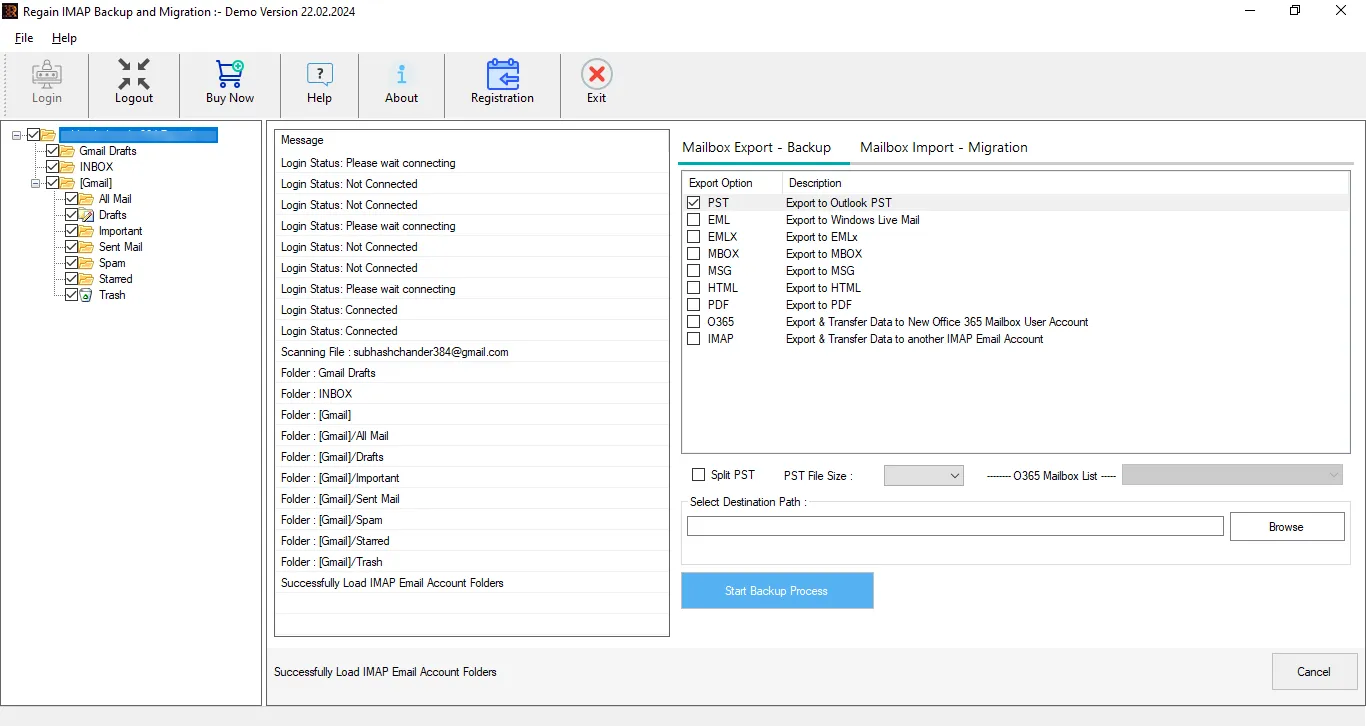
Regain IMAP to IMAP Migration software, along with migrating the IMAP email clients/server, offers the backup of the IMAP emails. Users can back up files like Outlook PST, MSG, EML, MBOX, etc. Moreover, if you want to back up in the PST file format, then you can set the resultant PST file size.
User-friendly GUI
The software is developed to provide an easy-to-use utility for IMAP Email-related tasks. Hence, this software is very easy to use and can be used by any end-user; prior technical knowledge is not mandatory. Users can migrate or back up their emails without any additional assistance.
Preserves the Folder Hierarchy
Regain IMAP Migration tool is a tested and verified utility and provides unaltered results. This tool properly maintains the folder hierarchy and preserves the data integrity. Moreover, users get all the meta-properties intact and make a carbon copy of the source in the target.
Demo before Purchasing License
To satisfy the users with the software working, a free demo version of the software is available to download. The trial version allows you to process the 10 items per folder, and once you enter the license then, it upgrades to the full version. The demo version is just a restricted version of the full version.
Round-the-Clock Free Technical Support
To assist our customers with all queries and doubts, we provide a 24*7 free technical support facility. Users can contact our team by live chat or write to us at support@regainsoftware.com. Moreover, a telephone number is also given on the Contact Us page for telephonic assistance.
Technical Specifications
System Requirements
- Processor - 1 GHz or faster processor
- Memory - 4 GB of RAM (4 GB is recommended)
- Hard Disk - 500 MB for Software installation
- Disk Space - Sufficient space for exported data
- Internet - Required for online mailbox migration
- Administrator - Administrator privileges may be required
Version Supports
- Windows OS Platforms - Windows 11, Windows 10
- Windows Server - 2012/ 2008 R2/ 2008/ 2003 R2/ 2003
- MS Outlook - 2021/ 2019/ 2016/ 2013/ 2010/ 2007 and 2003
- Supported Platforms - Gmail, Microsoft 365, Yahoo, Zoho, IMAP and other supported email services
Demo Software
Download Free IMAP Exporter Software to evaluate the software’s features, workflow, and compatibility. It allows you to migrate limited emails, up to 10 items per folder for testing.
Installation / Uninstallation
Manual IMAP Migration vs. Automated IMAP Migration
Manual IMAP Migration
- Time-consuming
- Manual folder handling
- Difficult for multiple accounts
- More technical steps
- Manual attachment handling
- Difficult to repeat
Regain IMAP Migration Tool
- Automated process
- Select folders before migration
- Supports multiple migration tasks
- Guided interface
- Migrates emails with attachments
- Migration can be rerun
Prerequisites for IMAP Email Migration
Before initiating migration, make sure
- Valid source email credentials
- Valid destination email credentials
- IMAP access enabled
- Required IMAP server/port information
- Stable internet connection
- Sufficient destination mailbox storage
- App password/OAuth/MFA requirements where applicable
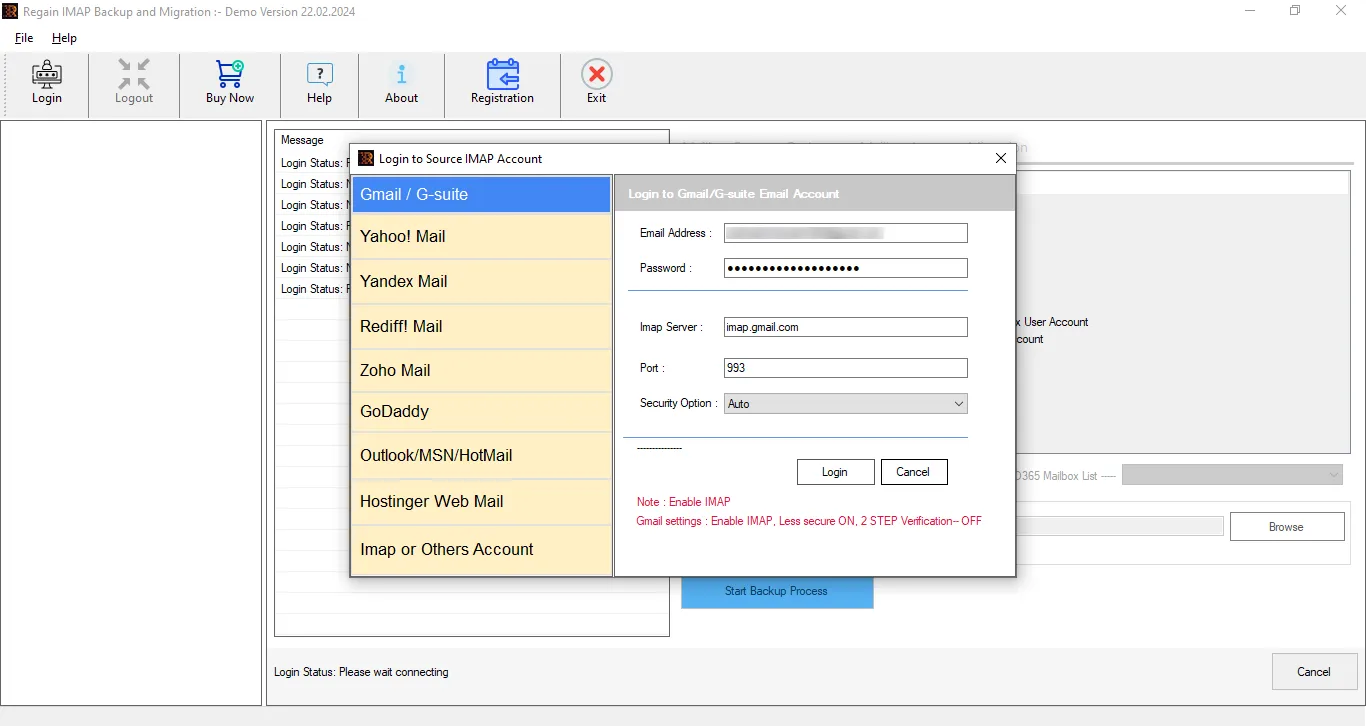
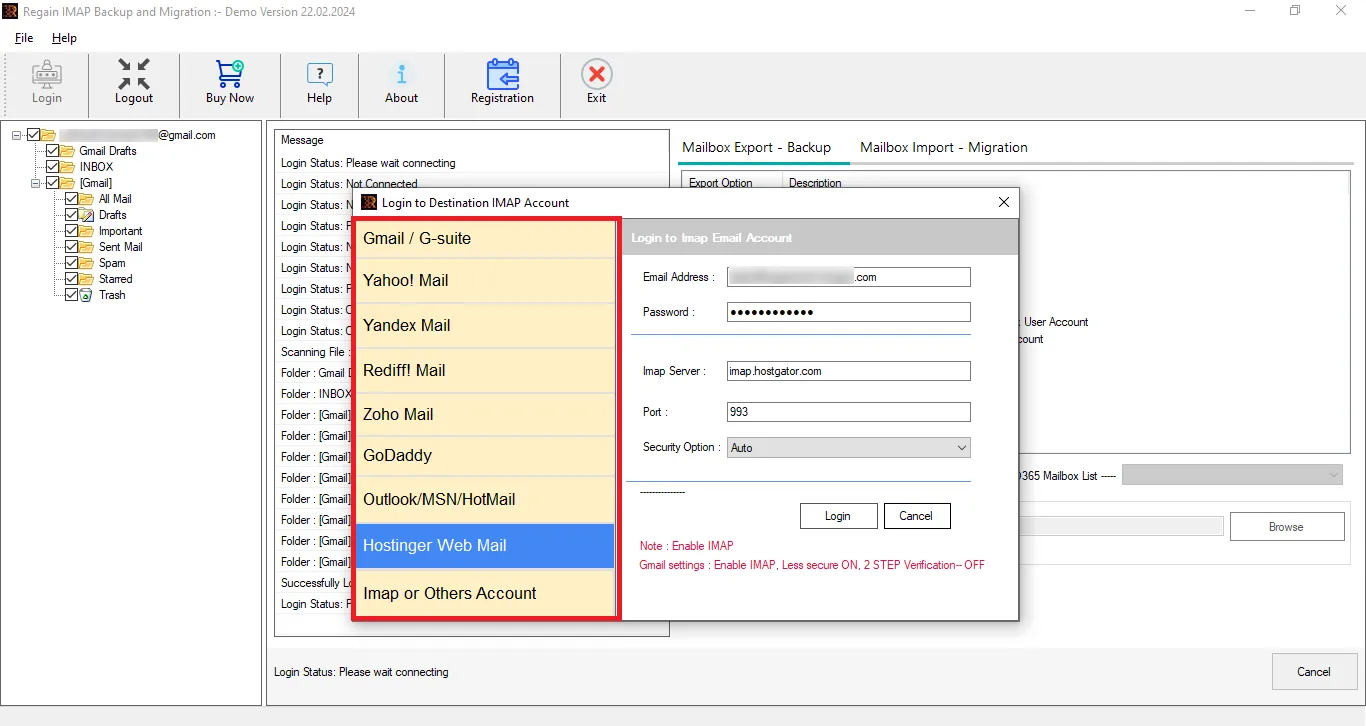
How to Migrate Emails from One IMAP Account to Another
Software Reviews
See What Customer Reviewing Companies and Customers Say About This Professional Utility:

CNET
Our team has identified this software as the one-stop utility for IMAP account email management. We tested IMAP migration to various targets, which worked proficiently with all. A speedy and effortless software!
Explore More →
Software Suggest
The GUI of the software is dedicatedly developed to provide an extra edge to non-technical users. Its effortless and straightforward interface makes it one of the best software in the industry! A professional utility by all means.
Explore More →
Crozdesk
It is a must to have a tool for the IMAP account owners to improve their email management. We had a Gmail to Gmail migration along with saving some special folders in MBOX; it did flawlessly an effortless and cost-efficient tool. The demo version facility is very user-centric.
Explore More →Feature Comparison between Free vs. Full Version Tool
| Software Features | Trial Version | Full Version |
|---|---|---|
| Instant way to Migrate IMAP Mailboxes to another IMAP Server | Save 10 items/Folder | ✔ |
| Export IMAP Server Folders to Local Drive | Save 10 items/Folder | ✔ |
| Backup IMAP Emails into PST, MBOX, MSG, PDF, EML and multiple Files. | Save 10 items/Folder | ✔ |
| Migrate IMAP Server emails to Office 365, Gmail, IMAP, G Suite etc. | Save 10 items/Folder | ✔ |
| Migrate or Backup Selected Folders | ✔ | ✔ |
| 24x7 Technical Support | ✔ | ✔ |
| Saving Capabilities | Save 10 items/Folder | ✔ |
| Price | Download | Buy Now |
Honest Customer Reviews
5.0
I am really impressed with the technical support facility offered by Regain Software. We had some queries, and their team assisted with a remote session in a very professional manner. Very professional team and software.
Kieron William
5.0
We executed multiple Zoho mail accounts to Gmail, and that too in a time-bound manner. Moreover, we filtered out the unwanted folders just by unchecking them a simple yet effective tool. Kudos to the developers!
Tim Henry
Frequently Asked Questions
Q. How to Migrate IMAP mailboxes to New IMAP account using Regain Software?
Follow all these steps to migrate IMAP mailboxes:
- Download, Install and Open Regain IMAP to IMAP Migration Tool.
- Enter the email address, password, IMAP Server type and other asked details.
- Software will display the Preview of all available mailbox folders.
- Now, Click on Cloud Migraion button and Select the IMAP as the target and enter the login credentials.
- Once the connection is established, you can move mailbox from One IMAP to Another IMAP account.
Q. Do I need two different licenses if I have IMAP for IMAP migration and an IMAP account for the Outlook PST backup task?
This multi-functional utility can execute multiple tasks with a single task. You can do both IMAP migration and IMAP backup tasks with a single license.
Q. I am using Windows 11 Pro; is this IMAP migration tool compatible with this operating system?
This software is compatible with all versions of Windows; hence, it will also work with Windows 11 Pro.
Q. Does this Regain IMAP Migration tool support multi-factor authentication for connecting Office 365 as a target?
Yes, this software supports both basic and multi-factor authentication (Two-factor authentication). In this way, it preserves the security of your email accounts.
Q. Do I need an app password to connect with the Gmail account?
Yes. Gmail has enhanced security measures while connecting with the Gmail account through third-party apps. You can connect easily with Regain IMAP to IMAP Migration Tool.
Q. How can I get technical assistance if required?
You can connect with our technical support team through the live chat or write to us at support@regainsoftware.com. A telephone number is also given on the Contact Us page.
Q. Does this software support all IMAP email servers?
Yes, Regain IMAP to IMAP Migration tool is compatible with all standard IMAP-supported email servers. It can seamlessly connect with popular email services such as Gmail, Yahoo Mail, Outlook.com, Zoho Mail, and many other custom or enterprise IMAP servers.
The tool uses standard IMAP protocols (host, port, SSL/TLS) to establish secure connections, ensuring smooth and reliable migration between different platforms without compatibility issues.
Q. Is an uninterrupted internet connection required for IMAP to IMAP migration?
Yes, a stable and uninterrupted internet connection is highly recommended during the IMAP to IMAP migration process. Since the migration involves transferring data between two live email servers, any interruption in connectivity may pause or temporarily stop the process.
However, the software is designed with advanced mechanisms that allow users to resume the migration from where it left off and minimize the risk of data loss and ensure continuity.
Q. Can I migrate selected mailboxes or folders to another IMAP server?
Yes, the Regain IMAP Migration tool allows selective mailbox migration. Users can choose specific folders or mailboxes to transfer instead of migrating the entire account.
This feature is especially useful for users who want to move only important or relevant data. It also helps save time, bandwidth, and storage by avoiding unnecessary data transfer.
Q. Does the tool support on-premises to cloud IMAP migration?
Yes, the software fully supports on-premises to cloud IMAP migration. You can easily migrate emails from local or hosted mail servers to cloud-based platforms like Google Workspace or Microsoft 365.
The tool ensures secure authentication and smooth data transfer, making it suitable for businesses moving from traditional infrastructure to modern cloud environments.
Q. Can I filter emails by date during migration?
Yes, Regain IMAP Migration tool provides advanced filtering options, including date-based filters. Users can specify a date range to migrate only emails within a particular timeframe.
Q. Is this tool suitable for both personal and enterprise-level IMAP migration?
Yes, the software is designed to handle both individual and enterprise-scale migrations. It can efficiently process small mailboxes for personal users as well as large volumes of data for businesses and organizations.
With its robust performance and scalability, this tool ensures reliable migration regardless of the size or complexity of the project.
Q. Does the software migrate emails along with attachments?
Yes, the tool migrates all emails along with their attachments from the source IMAP account to the destination IMAP account. It supports all types of attachments, including documents, images, and multimedia files.
Q. Do I need any additional software to perform IMAP email migration?
No, the Regain IMAP to IMAP Migration tool is a standalone solution and does not require any additional software installation. You only need valid source and destination IMAP account credentials along with server details.
Your Data Deserves a Secure Solution. Start with a Trial!
Choose the right software for your needs and experience best data management with a free trial before you buy.
Need Help? We're Here for You!
Our support team is available to assist you with your migration requirements.