Best Amazon WorkMail Alternative: Migrate AWS Email Data


Published On - October 24, 2026 by Nasir Khan | Reading Time: 5 minutes
As AWS has announced that Amazon WorkMail will reach its end of support on March 31, 2027, many users are now looking for reliable ways to move their mailbox data to another email platform. But before that, finding the best Amazon WorkMail alternative is the main task.
In this detailed write-up, we will explore some common alternatives and the process to migrate emails from Amazon WorkMail.
Explore Prominent Amazon WorkMail Alternatives:
Alternative 1: Microsoft 365 (Exchange Online)
Microsoft 365 is cloud-based software as a service that offers a one-stop solution for businesses. It is one of the top choices for migrating Amazon WorkMail emails.
- Along with email services offered through Outlook.com, it offers a lot: OneDrive, Teams, SharePoint, Excel, Word, and other commonly used services/applications.
- Users get all services in a single subscription and under a single roof.
- It is best suited if you have tech-related tasks like collaborative development (SharePoint will be used), Teams for communications and OneDrive for storage.
- Exchange Online (Microsoft 365) supports POP3 while Amazon WorkMail lacks it, and users get better control over DLP, MFA and eDiscovery through Microsoft Purview and Entra ID.
- Users can send attachments up to 150 MB with Exchange Online (Microsoft 365), while this is limited to 25 MB with Amazon WorkMail.
All the above-mentioned features make Microsoft 365 one of the best Amazon WorkMail alternatives.
Alternative 2: Google Workspace
It is a collaboration suite offered by Google to handle all needs of users.
- Users get Gmail (for email), Google Meet, Docs, Slides, Sheets and Google Drive as prominent services.
- Google Workspace offers AI-based threat detection, built-in data-loss prevention, and 2-step verification for security.
- Users can additionally add Voice, AI Ultra access, and Chrome Enterprise Premium with an additional subscription.
- Cost: Google Workspace is slightly costlier than Microsoft 365. However, pricing is subject to change.
Alternative 3: Zoho Workplace or Other IMAP-Supporting Platform
Zoho Workplace or other platforms like Yahoo and Yandex are suitable if you have limited or customized needs.
- Zoho focuses on an ad-free, privacy-first policy, and it is cost-efficient too.
- Other email platforms like iCloud Mail are best-suited for Apple users with the built-in Apple Mail client.
- Users can opt for these platforms depending on their needs and the customization available.
Available Methods for Email Migration from Amazon WorkMail:
In this section, we will explain two methodologies for migrating emails from Amazon WorkMail: manual workarounds and a professional utility. After exploring both methods, you can choose the one that best suits your requirements.
Manual Method to Migrate Amazon WorkMail to Microsoft 365
- Firstly sign in to the Microsoft 365 Admin Centre with your administrator account.
- Open the Exchange Admin Center and go to the migration section.
- Choose IMAP migration as the migration method.
- Enter the required Amazon WorkMail IMAP server details.
- Prepare a CSV file with the source and destination mailbox details.
- Upload the CSV file to the Microsoft 365 migration setup.
- Create and start the migration batch to begin transferring the emails.
- After completion, check the Office 365 mailbox for emails, folders, and attachments.
Manual Method to Migrate Amazon WorkMail to Google Workspace
- Firstly, sign in to your Gmail or Google Workspace account and open the account settings.

- Go to Accounts and Import and look for the option to import mail.
- Enter your Amazon WorkMail email address and provide the required IMAP server details and login credentials.
- Select the email data you want to import and configure the available import options.
- Start the import process. Gmail will connect to the Amazon WorkMail mailbox and begin importing the supported email data.
- After the process is completed, open Gmail and check the emails and folders to confirm that the required data has been transferred.


Why Professionals Don’t Prefer Manual Methods?
- High Risk of Data Loss – Important emails may be missed or accidentally deleted during the transfer.
- Requires Technical Knowledge – Users need to configure email accounts and settings correctly.
- No Bulk Migration Support – Managing multiple mailboxes manually can be difficult and inefficient.
- Very Time-Consuming Process – Migrating emails manually can take a significant amount of time, especially for large mailboxes.
Method 2: Migrate with a Professional Tool (Regain Amazon WorkMail Migration Tool)
Users can migrate to almost all Amazon WorkMail alternatives using this professional tool. You need to follow some simple steps, which are as follows:
Free Download100% Secure Buy NowPrice: $29
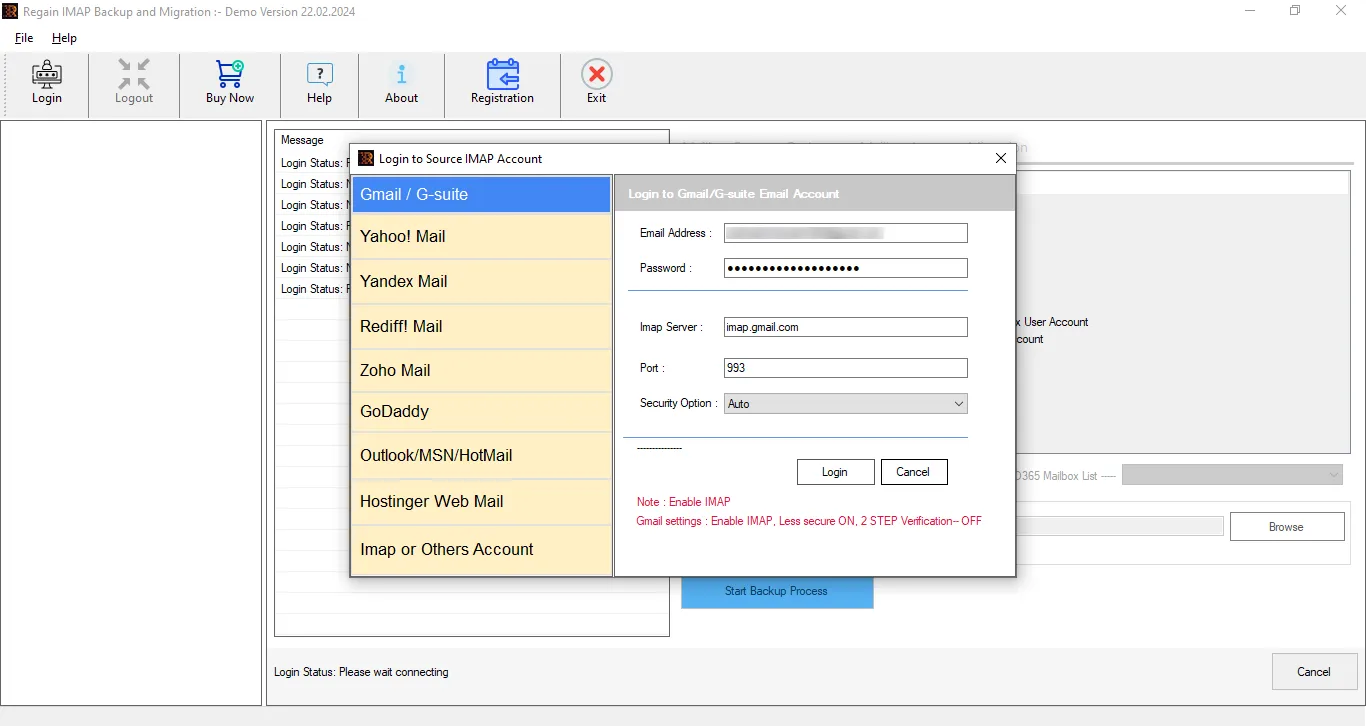
- Step 1 – Firstly, download and install the Regain Amazon WorkMail Migration Tool on your system.
- Step 2 -Go to IMAP and Other Accounts and enter your Amazon WorkMail email address and password.
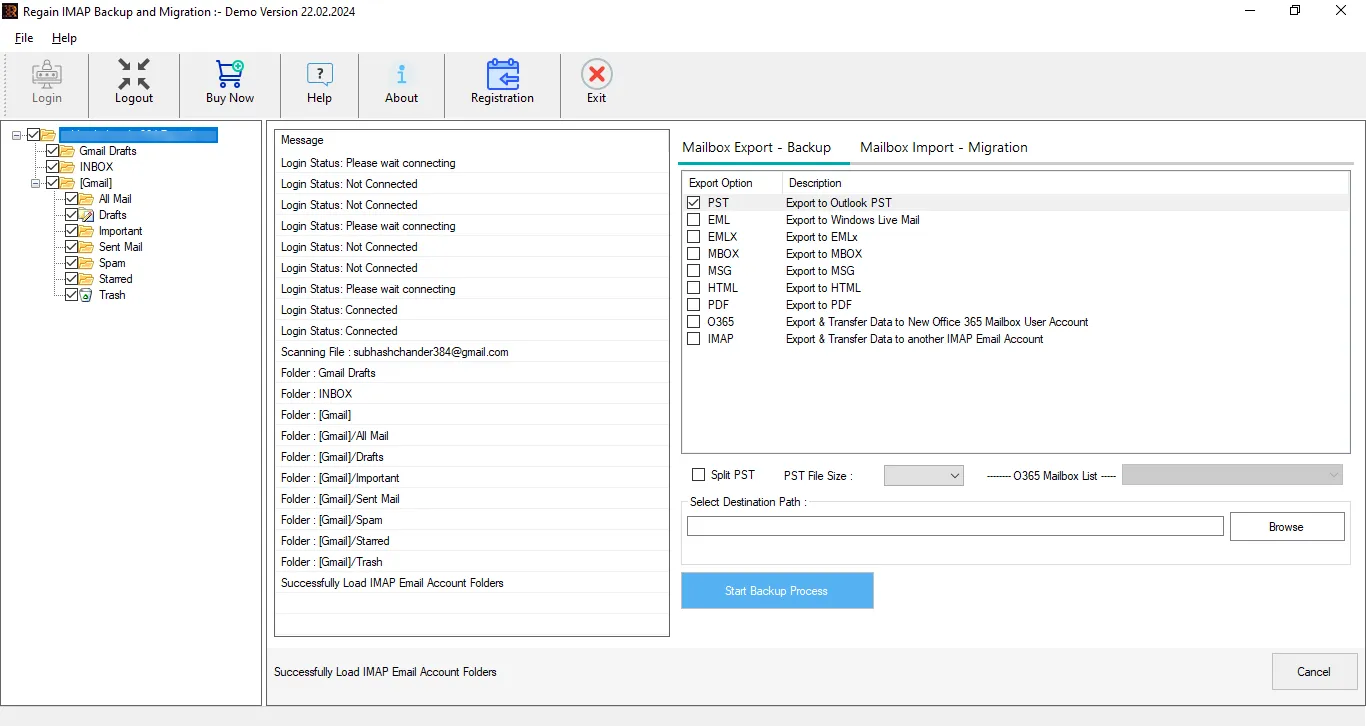
- Step 3 – Now you can have a preview of your Amazon WorkMail mailbox. Here, you can exclude the folders by unchecking them.
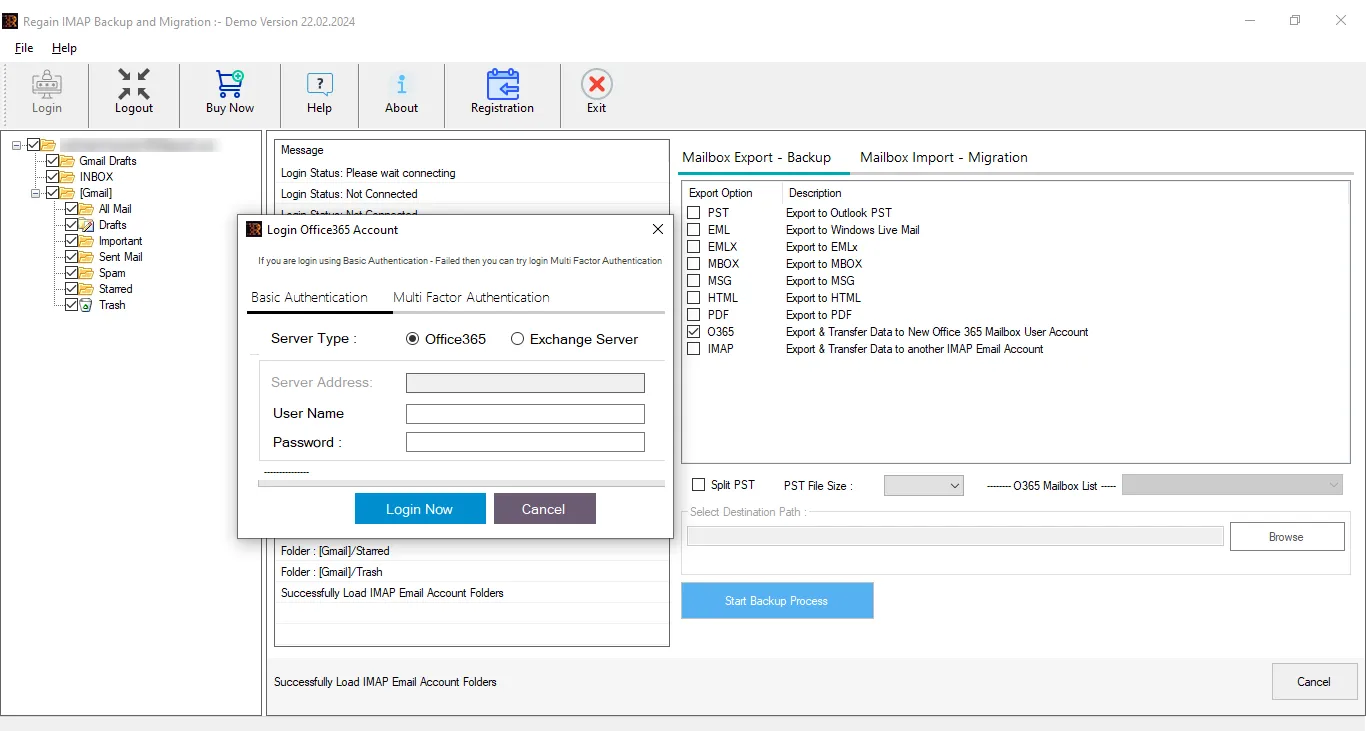
- Step 4 – Then, select and enter the destination account credentials ( Amazon WorkMail alternatives like Microsoft 365, Gmail or other IMAP accounts) and the software will start the Amazon WorkMail migration.
Key Features Offered by the Regain Amazon WorkMail Migration Tool
- Users can migrate from Amazon WorkMail to Microsoft 365, Google Workspace or any other IMAP platform like Zoho or Yahoo.
- Moreover, users can back up Amazon WorkMail data into PST, MSG, MBOX, EML, and PDF formats.
- It allows you to migrate multiple mailboxes without any size restrictions.
- Users get a preview before exporting to select/deselect folders.
- This software ensures that the original folder structure of your emails remains intact throughout the migration process.
- Regain Email Migration Tool comes with a very simple GUI; hence, it is easy to run.
- Users also get a free demo version of the software before purchasing it.
Gist of the Blog:
Amazon WorkMail is reaching its end of support on March 31, 2027, so users are looking for alternative email platforms. This guide explains the best alternatives and how to migrate Amazon WorkMail emails. While manual migration methods are available, they come with certain limitations and can be time-consuming. To make the migration easier and more efficient, users can use the Regain Amazon WorkMail Email Migration Tool. It is a one-stop utility to migrate Amazon WorkMail emails to any email platform chosen as an alternative. A free trial version of this tool is also available.
Frequently Asked Questions
Q. Is Amazon WorkMail shutting down?
A. Yes. Amazon WorkMail will reach its end of support on March 31, 2027. Moreover, it has stopped creating new accounts since April 30, 2026.
Q. What will be the folder structure in the target after email migration from Amazon WorkMail?
A. The software preserves the folder hierarchy within the mailbox. The folder structure will be the same in the target as in the source.
Q. Is manual migration of Amazon WorkMail easy?
A. Manual migration is possible, but it can require multiple configuration steps and may become time-consuming. We can’t consider it easy.
Q. Is there a tool to migrate Amazon WorkMail emails?
A. Yes. Regain Email Migration Tool can be used to simplify the migration of Amazon WorkMail email data to supported destination platforms. It can migrate to any Amazon WorkMail alternatives like Microsoft 365, Google Workspace, Zoho or any other IMAP-supported platforms.
Q. How can I contact technical support for the Regain Email Migration Tool?
A. You can reach Regain’s support team via live chat or phone—details are available on the Contact Us page.

