Explore the Amazon WorkMail to Microsoft 365 Migration Process


Published On - October 10, 2025 by Nasir Khan | Reading Time: 5 minutes
Amazon WorkMail is a cloud-based email and calendar service, a part of Amazon Web Services (AWS). It allows businesses to send and receive emails securely, manage calendars, and access mail from different devices. Despite advanced features and many services, many users are migrating from Amazon WorkMail to Microsoft 365, and they have their own reasons.
If you are planning to export Amazon WorkMail emails to Microsoft 365, this article will walk you through everything, including reasons for migration, manual approaches, challenges, and the most reliable method to make the process easier.
What Initiates Users to Export Emails from Amazon WorkMail to Microsoft 365?
First, let’s look at why users want to export their Amazon WorkMail emails. While reasons can vary, here are the most common ones:
- Enhanced Productivity Tools: Microsoft 365 provides advanced collaboration tools such as Teams, OneDrive, and SharePoint.
- Easy to use: Outlook works seamlessly with Microsoft 365, offering a smoother user experience than Amazon WorkMail.
- Access on any device: Being cloud-based, Microsoft 365 lets you open your emails and documents from any device with the internet.
- Security Concerns: Moreover, Microsoft 365 security features like multi-factor authentication and data loss prevention help keep users’ data secure.
- User-Centric Subscription Plans: Office 365 offers various subscription plans suitable for all kinds of end users.
Methods to Export Amazon WorkMail to Microsoft 365
There are two main ways to move emails from Amazon WorkMail to Microsoft 365:
1 – Manual Method (Using Microsoft Outlook)
Step 1: Configure Amazon WorkMail in Outlook.
- Then open Outlook and go to File > Add Account.

- Now, enter your Amazon WorkMail email address and password.

- Select IMAP/SMTP settings and finish configuration.
- Now Outlook will sync your Amazon WorkMail mailbox.
Step2: Export Amazon WorkMail Data to PST
- In Outlook, go to File > Open & Export > Import/Export.

- Then select Export to a file → Outlook Data File (.pst).

- Now choose the Amazon WorkMail mailbox and folders to export.

- Lastly, save the PST file to your computer.
Step 3: Import the PST File into Microsoft 365
- Configure your Microsoft 365 account in Outlook.
- Then go to File> Open & Export > Import/Export.

- Select Import from another program or File, Outlook Data File (.pst).

- Lastly, browse the PST file and import it into the Microsoft 365 mailbox.

This way, all your emails, contacts, and calendar items will be imported into your Microsoft 365 account.
Drawbacks of the Above Approach: Be Aware Before Using Manual Method
You can use the manual method given above, but it may come with several issues, which are as follows:
- The manual method cannot efficiently handle the migration of large numbers. If you have a business mailbox, then it is not for you.
- This process takes a significant amount of time and manual effort.
- There is a risk of data loss during export/import, and you may lose the folder hierarchy.
- Users need to be technically sound to configure accounts; a single mistake can lead to data loss.
Method 2: Export Amazon WorkMail to Microsoft 365 With a Professional Solution
The Regain Amazon WorkMail Backup and Migration Tool is the best and most reliable method to export emails from Amazon WorkMail. It is boosted by various user-centric facilities and offers a simple and straightforward process.
Free Download100% Secure Buy NowPrice: $29
- Step1: Firstly, install and launch the Regain Amazon WorkMail Backup and Migration Tool on your system.
- Step2: Now, enter the login credentials of Amazon WorkMail to connect it after selecting Imap or others Account.
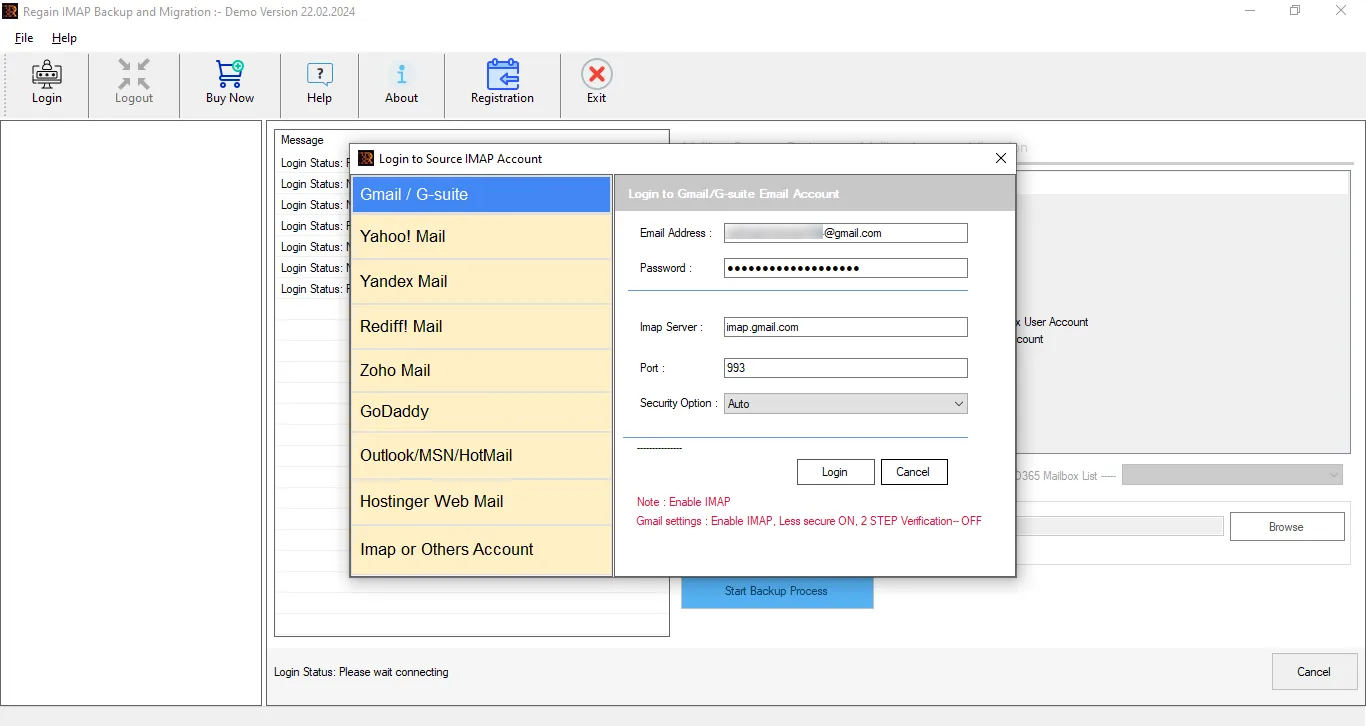
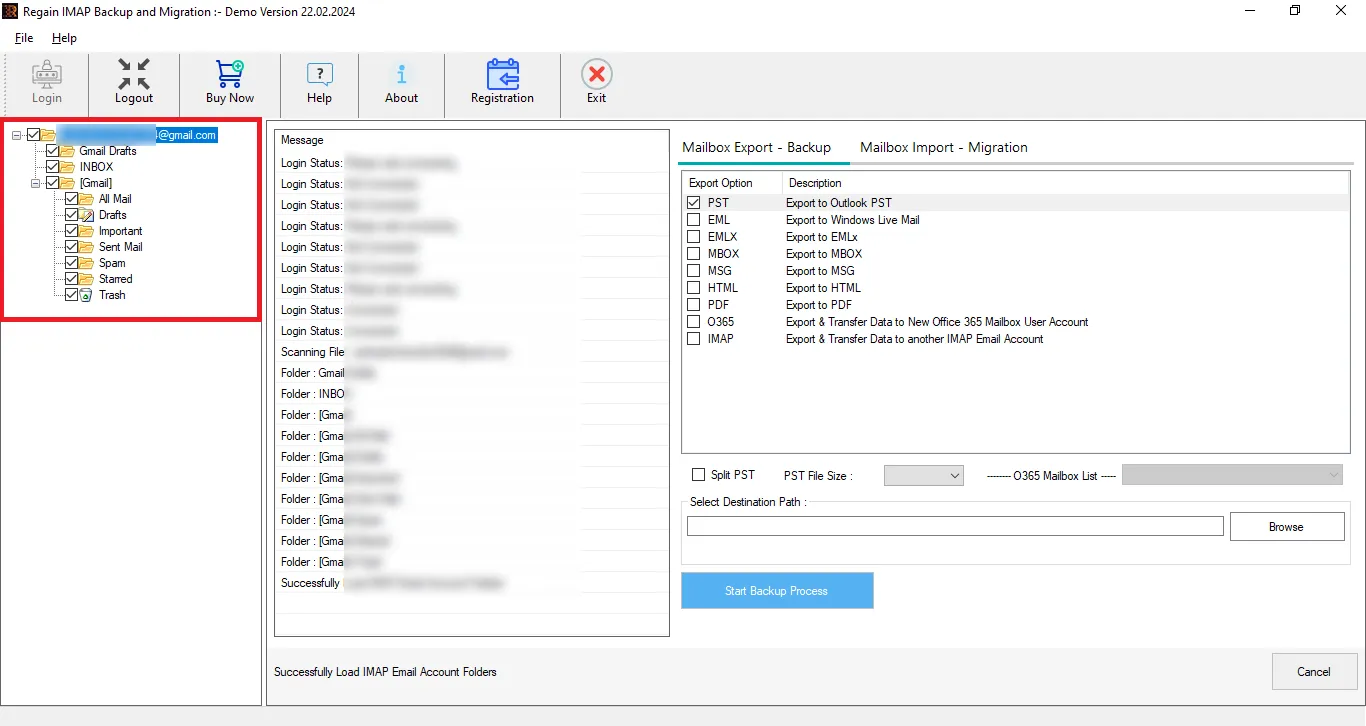
- Step3: Here, you can preview the files and folder details per your requirements.
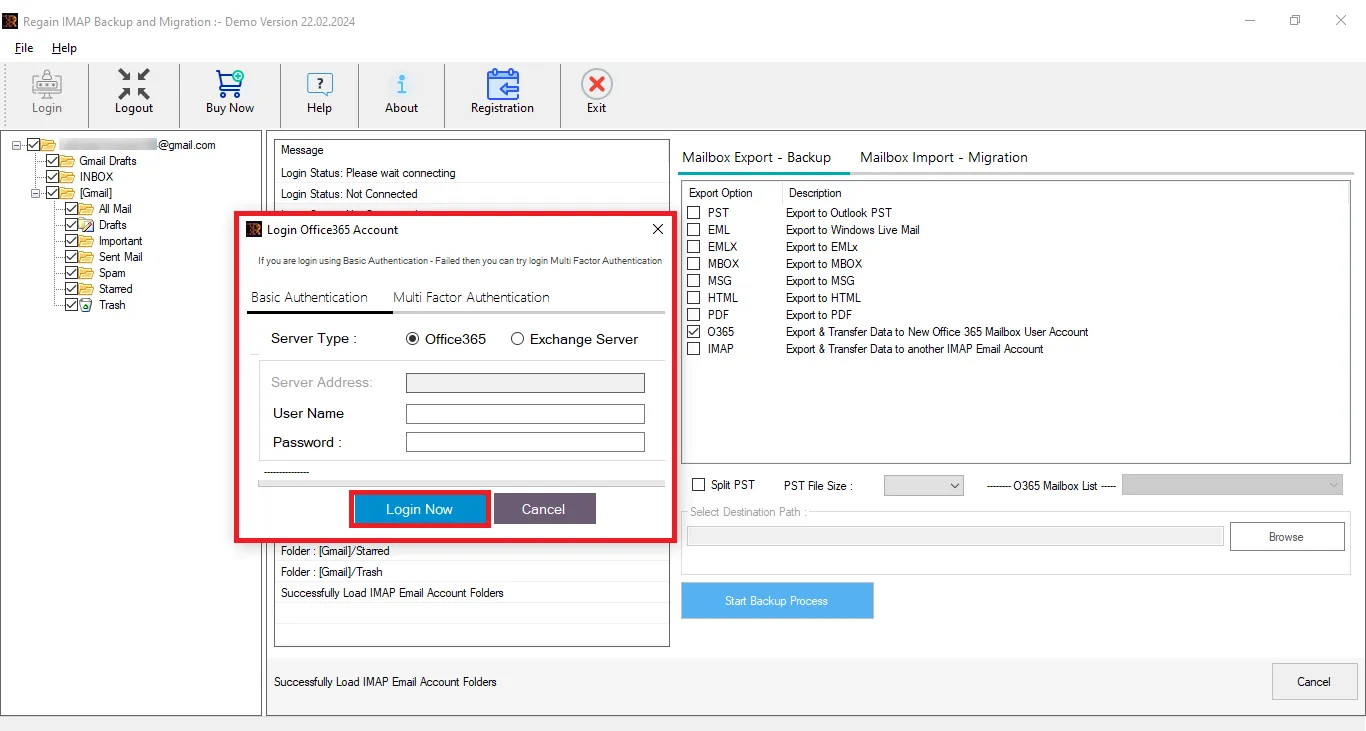
- Step4: Now, select Microsoft 365/Office 365 as the destination, and enter the Office 365 account credentials to connect with Microsoft 365.
- Step5: Click on the Export Now to start the email exporting.
Soon, all your Amazon WorkMail emails will be exported to Microsoft 365.
Notable Features of the Regain Amazon WorkMail Backup and Migration Tool
- The Regain Amazon WorkMail Backup and Migration software supports exporting to Gmail/Yahoo/Zoho/Outlook/Yandex/and all IMAP accounts.
- This tool offers a preview feature to cross-check their emails before exporting them.
- The Regain Email Migration tool also facilitates exporting to PST, EML, MSG, MBOX, PDF, et cetera.
- It also facilitates migrating to Microsoft 365 and On-Premises Exchange Server. This utility supports both basic and modern authentication to connect.
- The Regain Amazon WorkMail Backup and Migration tool maintains folder hierarchy and email structure after the export process.
- Regain Amazon WorkMail Backup and Migration tool supports all Windows OS and offers free 24/7 technical support.
- This software offers a free demo version of the software to check its compatibility.
Wrapping up:
Moving from Amazon WorkMail to Microsoft 365 gives users better features for email, teamwork, and security. You can use the manual method, but it is limited and takes time; not suitable for professionals. For professional or business purposes, using the robust Regain Amazon WorkMail Export Tool is highly recommended, as it saves time, maintains data integrity, and offers multiple export formats. Users can try this utility before purchasing.
Frequently Asked Questions
Q. Can I migrate only selected Amazon WorkMail folders to Microsoft 365?
A. Yes, the Regain Amazon WorkMail Migration and Backup software allows you to migrate specific mailboxes. Users can uncheck the folders to eliminate them.
Q. Do I need technical knowledge to perform an Amazon WorkMail migration?
A. The manual method requires technical skills, while the Regain Amazon WorkMail Export tool simplifies the process for non-technical users.
Q. Is there a risk of data loss during manual export?
A. Yes. Incorrect configuration or large mailbox exports can result in important data loss or corrupted files.
Q. Will I have the option to preview the mailbox before export?
A. Absolutely. The tool includes a preview feature to verify your data’s accuracy before you export it.
Q. Can I get information about the Regain Amazon WorkMail Backup and Migration tool?
A. Absolutely! If you have any questions about the Regain Amazon WorkMail Backup and Migration Tool, our support team is happy to help. You can reach them for free at support@regainsoftware.com or by using the live chat feature.
Q. Is there any size limitation on the mailbox for exporting?
A. No, the Regain Amazon WorkMail Email Migration Tool does not put any restrictions/limitations on the size of the mailbox for exporting. Moreover, there is no limitation on the number of mailboxes.
Related Articles:


