Speedily Migrate Roundcube to Office 365 in a Few Steps


Updated On - November 21, 2025 by Nasir Khan | Reading Time: 5 minutes
Do you also rely on Roundcube for your emailing, but now you want to migrate to Office 365? If yes is your answer and you are looking for an easy way for this, then you have come to the right place. In this blog, we will tell you an easy way by which you can speedily migrate from Roundcube to Office 365. But before this, let’s know what differentiates Office 365 from Roundcube.
Difference between Roundcube and Office 365:
Roundcube:
Roundcube is a web-based email client primarily used to access emails on self-hosted servers. It offers basic email functionalities such as filtering, composing, and organizing emails.
Office 365:
On the other hand, Office 365 is a cloud-based subscription service that offers Exchange Online, Excel, OneDrive, SharePoint, and Microsoft Office Web Apps.
Why There is a Big Tilt from Roundcube to Office 365?
People switch from Roundcube to Office 365 (Microsoft 365) because Office 365 offers more features and better services than Roundcube. Here are some of them:
Access from Anywhere:
Users often transfer Roundcube to Office 365 for its cloud-based access, allowing them to access their data from anywhere with a secure internet connection. Not just emails but other services, too.
Robust Security:
Office 365 has strong security to keep your data safe. It includes powerful tools like Advanced Threat Analytics, Message Encryption, and Data Loss Prevention. Moreover, multi-factor authentication for login is also available.
Real-Time Collaboration:
Office 365 enables users to collaborate effortlessly on shared projects in real-time. Multiple team members can work on the same document simultaneously. This Office 365 streamlined approach ensures everyone is always working on the most up-to-date version, enhancing productivity, reducing errors, and securing your data.
Cost-effective:
Office 365 comes with flexible subscription plans to fulfill your requirements. It provides you with better security at a low cost, and you do not have to spend separately to update it. It is included in your subscription.
Learn more about our Professional Regain IMAP to IMAP Migration tool
Available Methods for Migrating Roundcube to Office 365:
Here, we will elaborate on two solutions for accomplishing the migration process of Roundcube to Office 365. After reading both of them, you can choose accordingly.
1st- Manual Method
Step1: Add Roundcube Email to Outlook
- Open Microsoft Outlook on your computer.
- Go to File and click on Add Account.
- Now, enter your Roundcube email and password.
- Select “Let me set up my account manually” and click Advanced options.
- Select IMAP or POP and press the Next button.
- Enter your incoming/outgoing mail server details and correct port numbers.
- Complete setup using your Roundcube email password.
Step2: Export Emails to a PST File
- In Outlook, go to File > Open & Export > Import/Export.
- Choose Export to a file, then click Next.
- Select Outlook Data File (.pst) and click Next.
- Select the folders you want to export.
- Choose a location to save the PST file and give it a name.
- Click Finish to create the file.
Step3: Upload the PST File to Office 365
- Use Microsoft’s network upload method to move the PST to Office 365.
- Download and install the AzCopy tool.
- Get the SAS URL from the Microsoft 365 compliance portal.
- Use AzCopy to upload the PST file.
- Create a PST mapping file to link the PST with the right user mailbox.
- Go to the Microsoft 365 Compliance Center and start a PST import job.
- Apply filters if you only want to import specific data.
Things You Should Know Before Migrating Manually:
- It is a very time-consuming process; large items often get stuck.
- You may lose your folder hierarchy and meta properties, resulting in scattered emails in the target.
- You will need sufficient technical knowledge to perform the manual method. A wrong step can be dangerous.
- There are three different phases and each phase is an Everest-winning task.
2nd Method – Speedily Migrate with Regain IMAP Backup and Migration Tool
If you want to migrate Roundcube to Office 365 without spending much time, then you have the Regain IMAP Backup and Migration Tool. It is boosted with multiple user-centric features, and you can complete this migration process with just a few clicks.
Free Download100% Secure Buy NowPrice: $99
Simple Steps to Migrate Roundcube to Office 365:
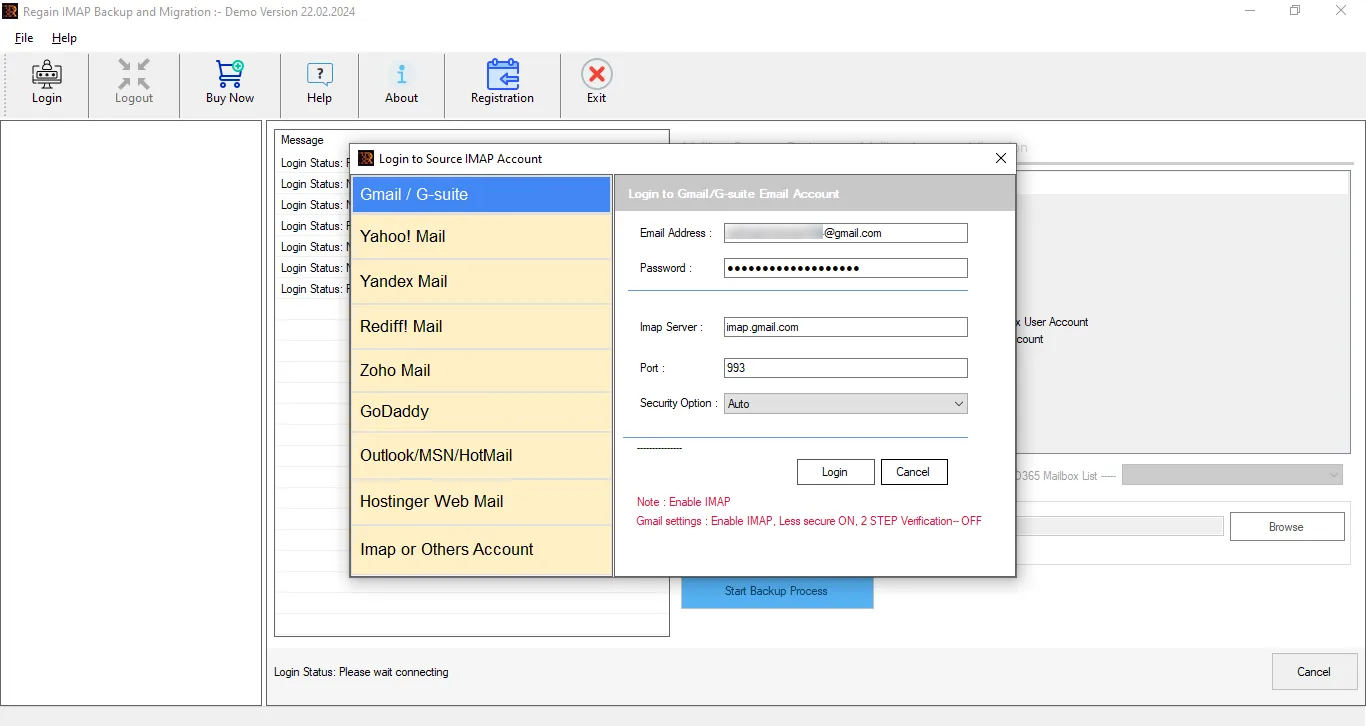
- First, launch the Regain IMAP Migration and Backup Tool and enter the Roundcube login credentials.
- The software will preview the folders within the mailbox; select the Roundcube folder.
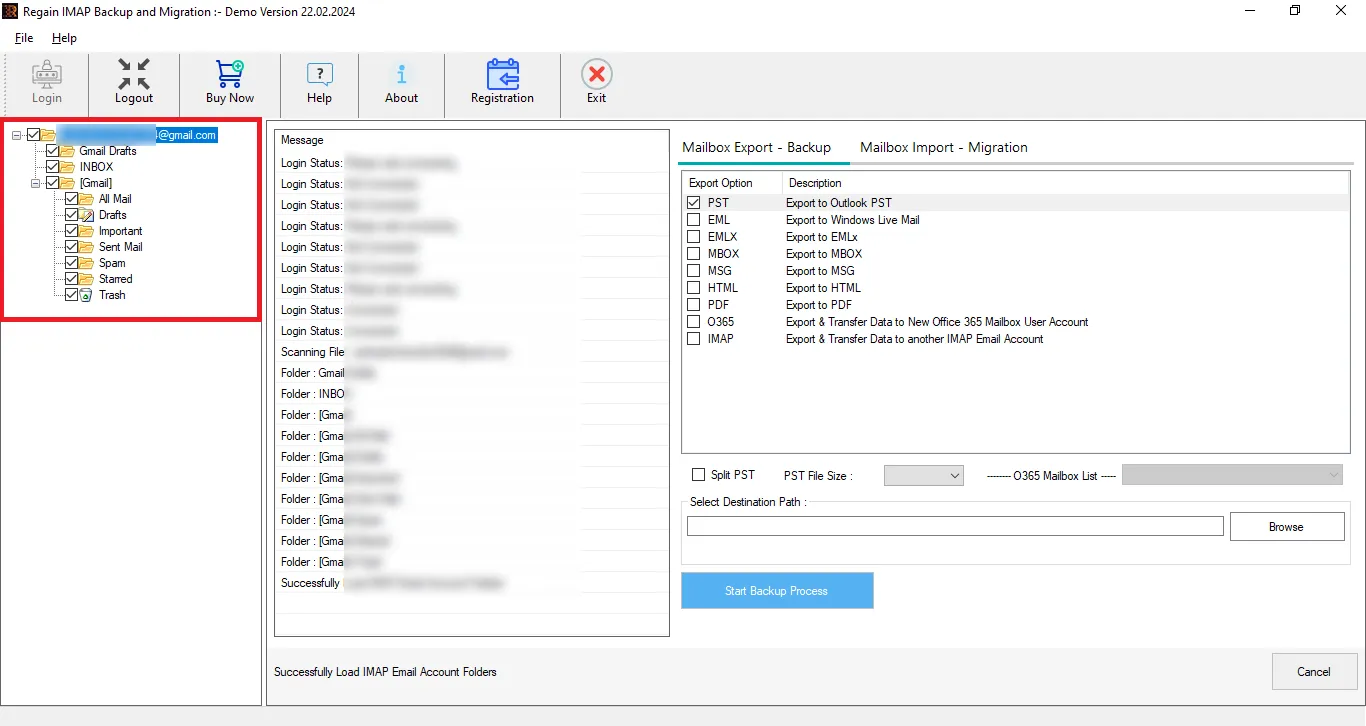
- Now, select the target: select Office 365 as the target under the Mailbox Export-Backup.
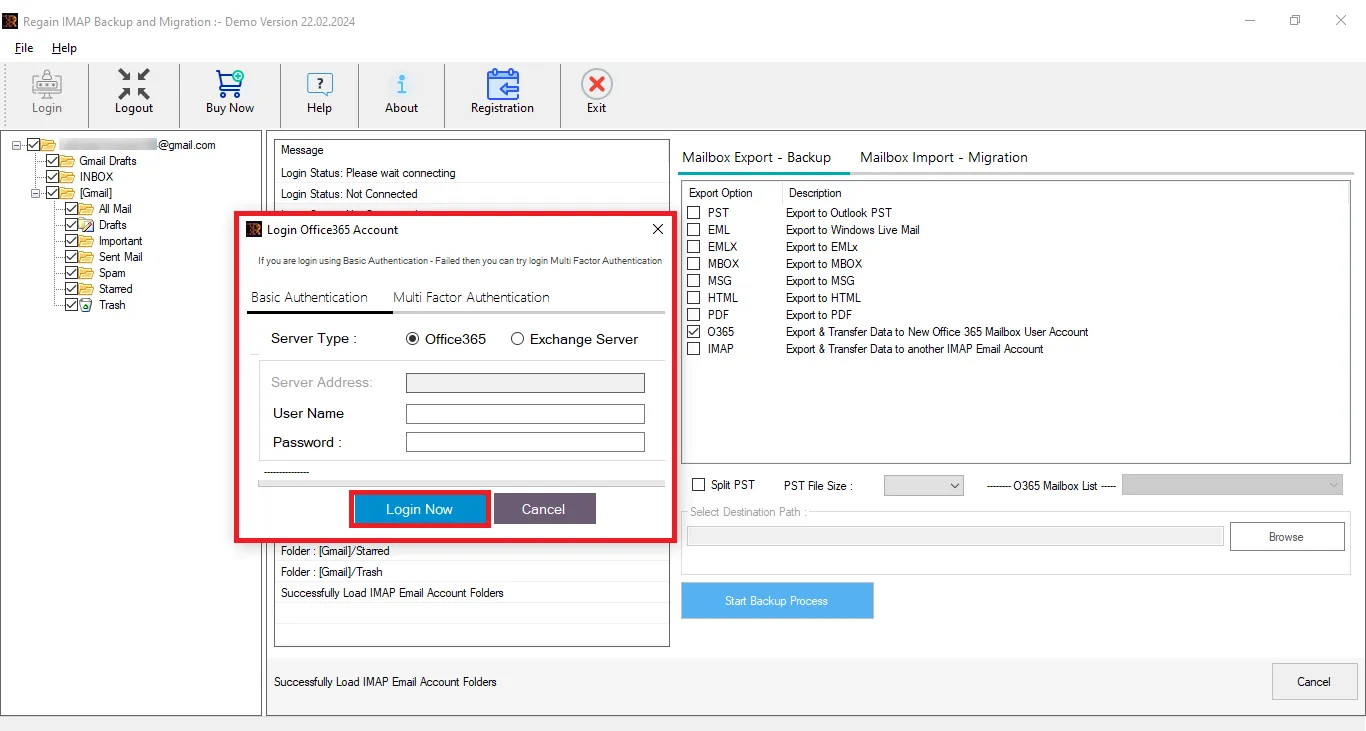
- Migrating to another IMAP account: Enter the Office 365 account credentials and start migrating.
You can migrate from Roundcube to Office 365 by following the few simple steps above.
Video Tutorial for Roundcube to Office 365 Migration Using Regain Software – Watch Now!
Gist of the Blog:
Migration towards advanced technology is obvious, hence Roundcube’s move to Office 365. Moreover, every business has its own needs, but one requirement is common: the mode of migration. Manual migration methods are not for professionals or large-scale migration. Professionally developed software like Regain Roundcube to Office 365 Migration Tool is a one-stop solution. Moreover, users get a demo of the software to be satisfied before purchasing the software.
Frequently Asked Questions:
Q. Can I import multiple Roundcube emails to Office 365 at once?
A. Yes, you can absolutely import multiple Roundcube emails to Office 365 at once with the help of this Regain IMAP Migration and Backup tool.
Q. Is the manual method considered risky in Roundcube to Office 365 migration?
A. To do the manual method, you have to be a technical expert; otherwise, a wrong setting done by you can cause you to lose a lot of data, and your file can also get corrupted.
Q. Where can I get information about the Regain IMAP Migration and Backup Tool?
A. If you want to know anything about this tool, then you can get information from our support team at support@regainsoftware.com. You can also connect with us through live chat and telephone, which is free of cost.
Q. To what other targets can this tool migrate?
A. This utility can migrate from any email client/ server that uses IMAP. Moreover, it facilitates migration to all IMAP using email clients like Gmail and Zoho. It can also take email backups in prominent file formats like PST, MBOX, EML and MSG.
Related Articles:


