Export Emails from Domain to Gmail – Simple Steps


Updated On - September 24, 2026 by Prakriti | Reading Time: 8 minutes
Domain email addresses are the biggest online identity in emailing, and all new businesses opt for them. Email addresses, including the particular department like sales@domain.com, support@domain.com is prevalent in the market. Domain email addresses are suitable for trust building and communicating/ contacting clients. However, some reasons are initiating users to export emails from domain to Gmail. We will understand the complete scenario and learn about a direct way to export emails from any domain to Gmail.
Why is there a need to migrate domain email to Gmail?
- The first thing that comes to mind when choosing a domain email address is brand image. For authorization and trust building, businesses opt for domain email addresses but forget about technical aspects.
- Domain email addresses may lack technical aspects, while Gmail, a product of tech giant Google, is boosted with many advanced features.
- Reasons like name changes, business mergers, and email management also initiate the export of domain emails to Gmail.
- Gmail offers scalability by switching to Google Workspace and using all its technologies. With a single Gmail account, you get many other facilities like Spreadsheets, Doc, Keep, Slides, Drive, and many more.
Learn more about our Professional Regain IMAP to Office 365 Migration tool
Free Method to Export Domain Emails to Gmail
To be straightforward, I would like to clarify that there are only two ways/ methods to export domain emails to Gmail. The first one is the manual way, which includes adding an IMAP account to Gmail through Gmalify.
Manual Steps to Export Domain Email to Gmail through Gmailify:
- First login to your Gmail account.
- Click on the gear icon, and go to See all Settings.
- Then select the Accounts and Import tab.

- You can choose b/w Import Mail and Contacts option or you can also use Add a mail account option.
- Enter the email address of the account you want to migrate/add to Gmail.
- A window will pop up asking you to sign up for the account you are trying to import.
- Give the Gmail access and you account will get added.


Google is discontinuing Gmailify and POP-based ‘Check mail from other accounts’ for new users. If you need to migrate an existing domain mailbox to Gmail/Google Workspace, use a professional Regain IMAP Migration Tool.
Before Moving Ahead, Read These Points:
- As Gmail states, you can only migrate messages, not folders or labels.
- If your domain account doesn’t support a secure connection, then you will not be able to use it this way.
- Exporting Domain emails to Gmail may take many days.
- You will miss the hierarchy. The folder hierarchy of the mailbox will get disturbed.
- If you are not technically sound, then it may risk your email data.
Professional tool to Migrate Domain Emails to Gmail/Google Workspace
Business emails are crucial to us; hence, we need to take proper care of them. No professional wants to mess with the hustle of manual migration; hence, a professionally developed solution is a must. Regain Software has also developed an advanced utility called Regain IMAP Migration Tool. This tool can migrate/backup emails from any email server/ client that uses IMAP. See how efficient it is:
- This utility can export/ backup emails from any domain to Gmail. Moreover, it is compatible with all the IMAP-using email clients/servers. Moreover, you can migrate IMAP emails to Office 365.
- There is no restriction on the mailbox size and mailbox number.
- Along with email migration, it also allows backup in the local storage. Users can back up emails in PST, MBOX, and MSG, which are commonly used file formats.
- Users can check/uncheck the folders before exporting. Excluding folders is also possible.
- Regain IMAP Backup and Migration Tool is compatible with all the versions of Windows OS.
- The utility preserves the folder hierarchy; hence, you will get the same folder hierarchy in Gmail as in Domain email.
Free Download100% Secure Buy NowPrice: $49
Export Your Domain Emails to Gmail in a Few Clicks:
- Start with installing the Regain IMAP Migration Tool.
- Enter the login credentials of your Domain Email to create a connection with the source.
- After connecting, the software will now preview the folders present with the account added. You can exclude any folder by unchecking.
- Next, opt for the Export-Migrate option and enter the login credentials of the Gmail account in which you want to export emails.
- The software will create a connection with the source and start exporting emails as you give a nod.
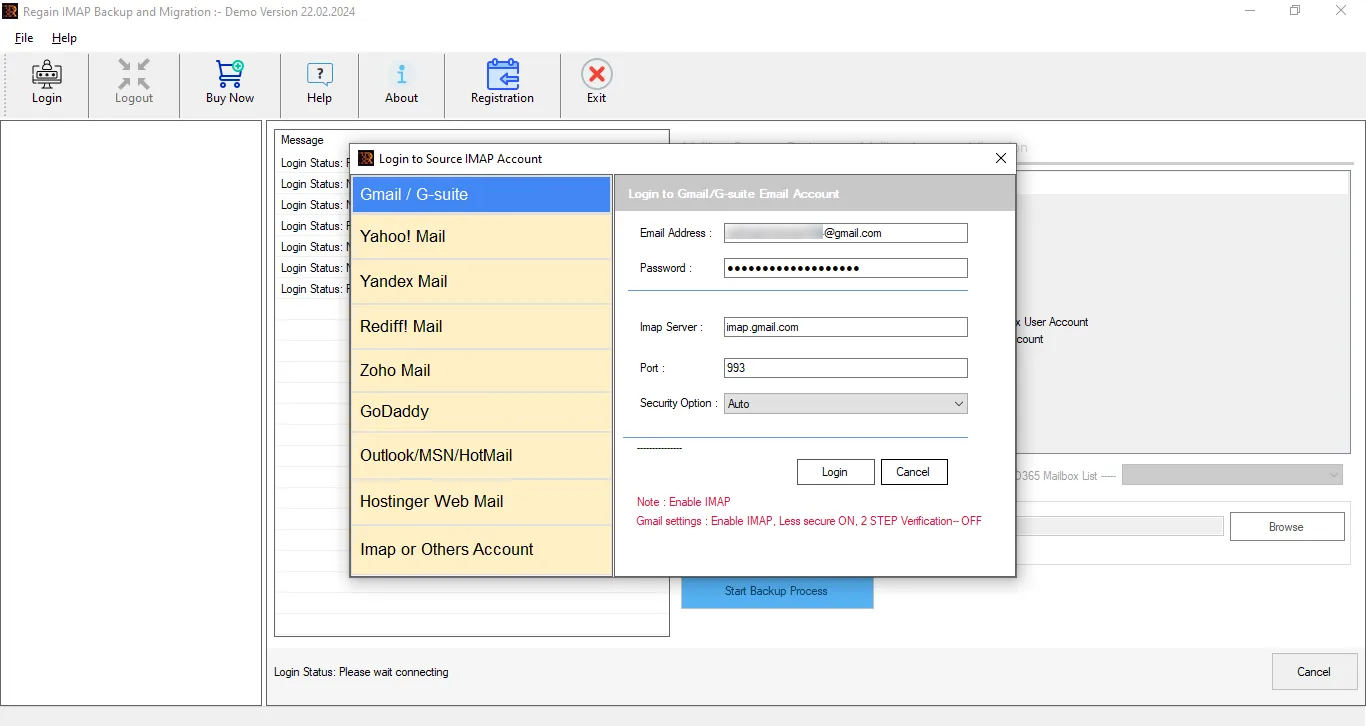 Enter the login credentials of your Domain Email to create a connection with the source.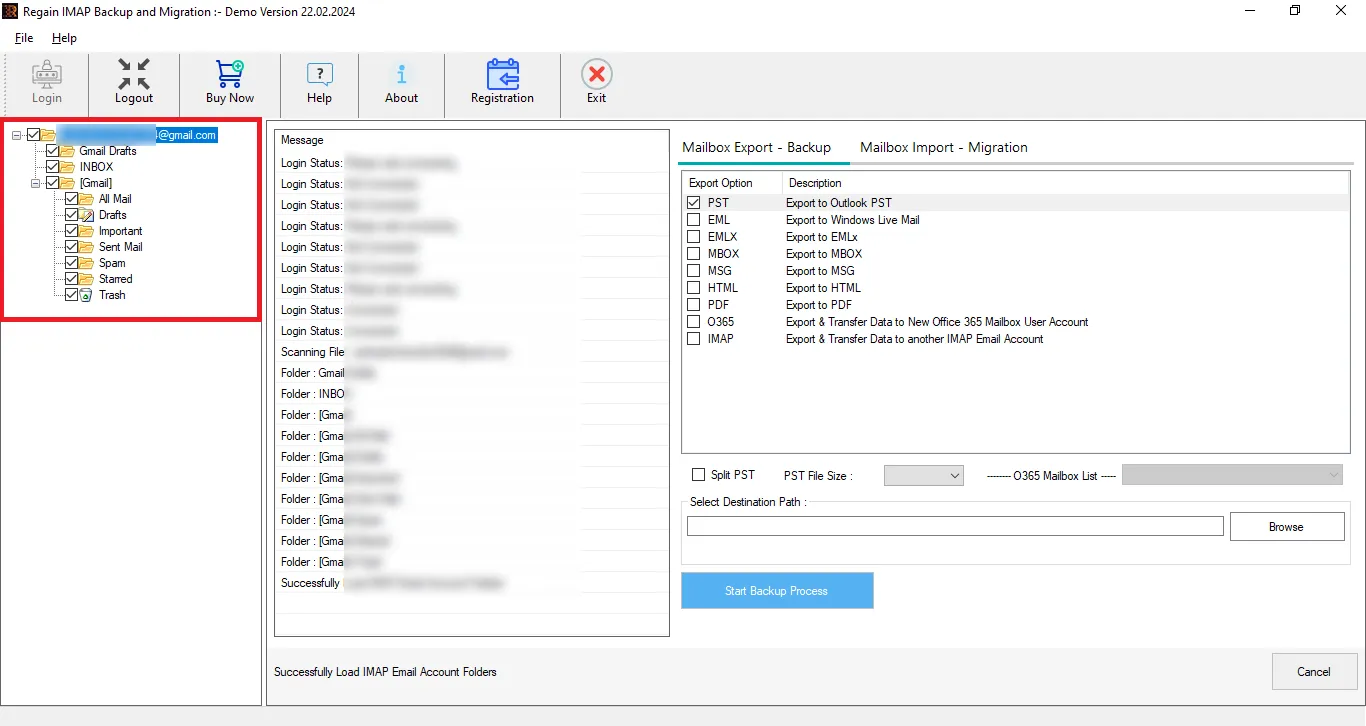
Video Tutorial for Domain Emails to Gmail Migration Using Regain Software – Watch Now!
Final Words:
This blog has explained the ways to export Domain emails to Gmail. It mentions two methodologies: one is using the manual method and adding a domain account to Gmail through Gmail. However, the manual process has a lot of disadvantages, such as not being able to migrate folders or labels. For proficient and complete migration, Regain IMAP Backup and Migration Tool is the first choice of professionals. Must install the tool for free and have a demo.
Free Download100% Secure Buy NowPrice: $49
Frequently Asked Questions:
Ques1. Can I migrate all the folders/labels through Gmailify or manually add a mail account to Gmail?
Ans. No, you can’t. If you manually migrate by adding an account to Gmail, then you will only be able to migrate email. It doesn’t migrate folders/ labels; hence, your folder hierarchy will get disturbed.
Ques2. Can this IMAP Migration Tool migrate folders as well?
Ans. Yes, the IMAP migration tool can migrate folders/labels. Moreover, it maintains the folder hierarchy.
Ques3. I want to purchase the license to export domain emails to Gmail, but I need technical assistance; do you provide technical support?
Ans. Yes, we do that too for 24*7. Users get free technical support with the Regain IMAP Backup and Migration Tool. You can contact us through live chat or write us at support@regainsoftware.com.
Ques4. Can I do both the migration and backup tasks with a single tool?
Ans. Yes, you can export/migrate and back up the mailbox emails with a single license. You can migrate to any IMAP email account and back up in PST, MBOX, and MSG-like file formats.
Ques5. Can I move my domain email to Gmail?
Ans. Yes. You can migrate emails from a domain-based mailbox to Gmail or Google Workspace using Gmail’s available import options and by using Regain IMAP Migration tool.
Ques6. Can I migrate multiple domain mailboxes to Gmail?
Ans. Yes. For multiple mailboxes, a dedicated IMAP migration tool is more convenient than manually importing each account. Regain IMAP Migration Tool supports bulk mailbox migration to Gmail and Google Workspace.
Ques7. Does Gmail import preserve email folders?
Ans. Gmail’s basic import option may not preserve the original folder structure. If maintaining folders is important, use an appropriate Google Workspace migration method or dedicated Regain IMAP migration tool.
Ques8. Can I migrate domain email to Google Workspace?
Ans. Yes. You can migrate emails from your existing domain mail server to Google Workspace and then update your domain’s MX records to route new messages through Google.
Ques9. Is Gmailify still available?
Ans. Google is discontinuing Gmailify and POP-based continuous mail fetching for new users. Existing users can continue using the feature until January 2027. For new migrations, use Google Workspace migration tools or IMAP migration instead.
Ques10. Can I migrate emails without losing the original mailbox?
Ans. Yes. IMAP migration generally copies email data to the destination while leaving the source mailbox unchanged. You can verify the migrated data before switching your mail service.
Ques11. Can I migrate domain emails in bulk?
Ans. Yes. Regain IMAP Migration Tool can help migrate multiple domain mailboxes in bulk, making it more practical than manually transferring emails through Gmail.
Ques12. Do I need to change MX records after migration?
Ans. Yes, if you want new emails to be delivered to Google Workspace. MX records should be updated after the migration and verification process is complete.
Ques13. Can I migrate emails from cPanel, GoDaddy, or other domain mail servers to Gmail?
Ans. Yes. If the source mail server supports IMAP, you can migrate its mailbox data to Gmail or Google Workspace using an IMAP migration method such as Regain IMAP Migration Tool.
Related Articles:

