Export Postbox Emails in an Effortless and Efficient Manner


Updated On - September 2, 2025 by Nasir Khan | Reading Time: 3 minutes
In today’s technically advanced era, managing emails is a hassle if your emails are cluttered. To manage them efficiently, if you want to move to a new platform or want to take a backup of your data, it becomes necessary to export emails. If you are using Postbox, which is a well-known email client, and want to know about the process to export Postbox emails from it, then this blog is perfect for you.
We know that Postbox is a desktop-based email client that manages multiple email accounts. A lot of users use it, and if you are one of them, here is all the information about exporting Postbox emails.
Why Do Users Export Emails from Postbox?
Before knowing the export process of Postbox emails, let us know why users export Postbox emails. However, the reasons can be different for everyone, but some of the common ones are:
● Switching to Another Platform
By exporting Postbox emails, you can switch between different emailing platforms like Office 365, Gmail, Yahoo, Microsoft Outlook, Thunderbird, etc.
● To Manage Storage
You can reduce storage by exporting your old and less-used Postbox emails by archiving them. It helps to manage storage if you have a lot of emails.
● To Get Updated Features
By exporting Postbox emails to the new platform, you can take advantage of a variety of newly updated features that will make your email management even better.
● Backup and Protection
You can create a secure backup by exporting Postbox emails so that you can still have access to your emails even if you accidentally delete your data or lose your server.
Learn more about our Professional Regain IMAP to Google Workspace Migration tool
Methods to Export Postbox Emails:
Here, we will discuss two ways for accomplishing the export process of Postbox emails. After evaluating both of them, you can choose accordingly; however, professionals always go with the advanced third-party solution.
1 – Manual Method
- Firstly, open the Postbox on your system.
- Now, go to the folder (like inbox or sent) that you want to export.
- Then select your emails.
- Use Ctrl + A (for Windows) or Cmd + A (for Mac).
- Now drag the selected emails from Postbox.
- Lastly, drop them into a folder on your desktop or another location.
Limitations and Drawbacks of the Manual Method
You can use the manual method given above, but it may come with several issues, which are as follows:
- Using the drag-and-drop method, your data will be saved, but the hierarchy of your folder will not be maintained. Your emails will get scattered.
- The user must be technically sound while performing this export process, as a wrong setting may lead to your data loss.
- Manual methods may cost you more time and effort. It is not as simple as it looks.
- Using the manual method can lead to accidental deletion and missing emails when you are exporting large data.
2 – Professional Method to Export Postbox Emails
You can export Postbox emails easily and in just a few minutes using Regain’s Postbox Export Tool. This tool has been tested by experts, which proves its accuracy and 100 percent result.
To perform this export task, you need to follow some simple steps, which are as follows:
- Step 1: First, install the Regain Postbox Export Tool on your system.
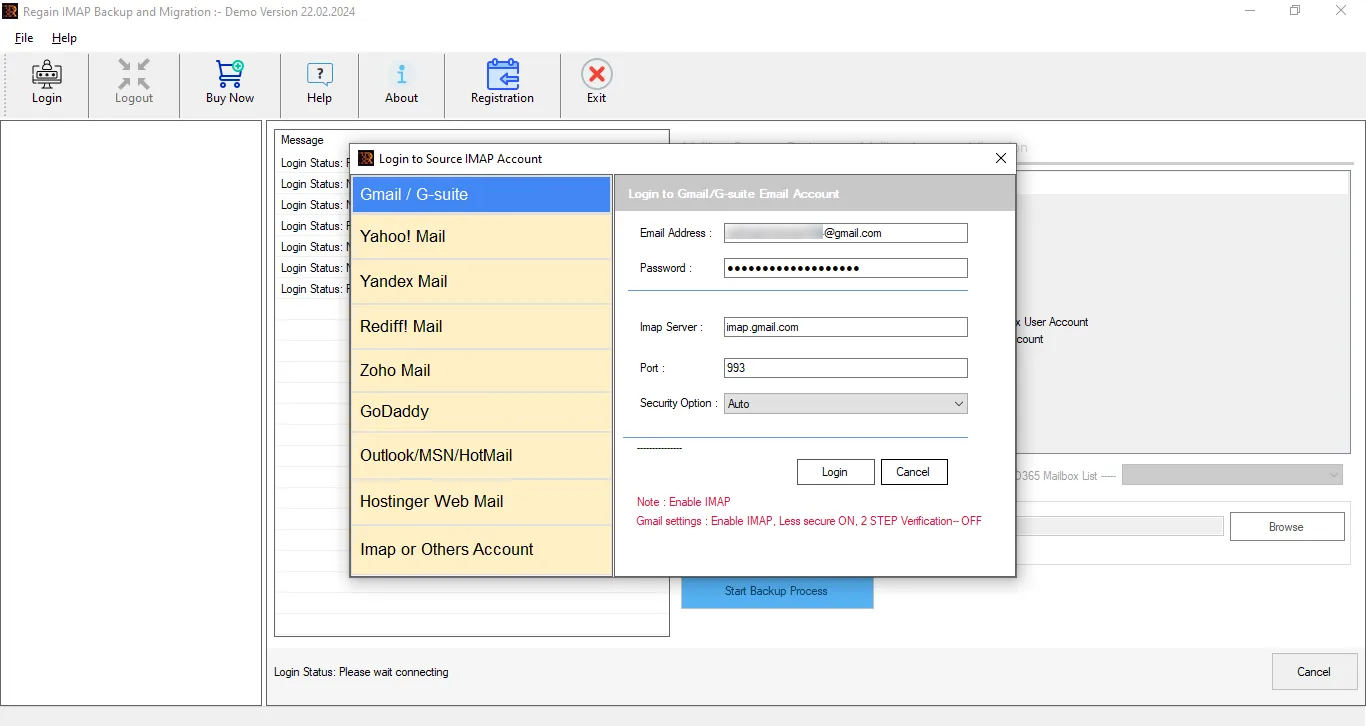
- Step 2: Now, enter the login credentials (username, password and other details) of your account.
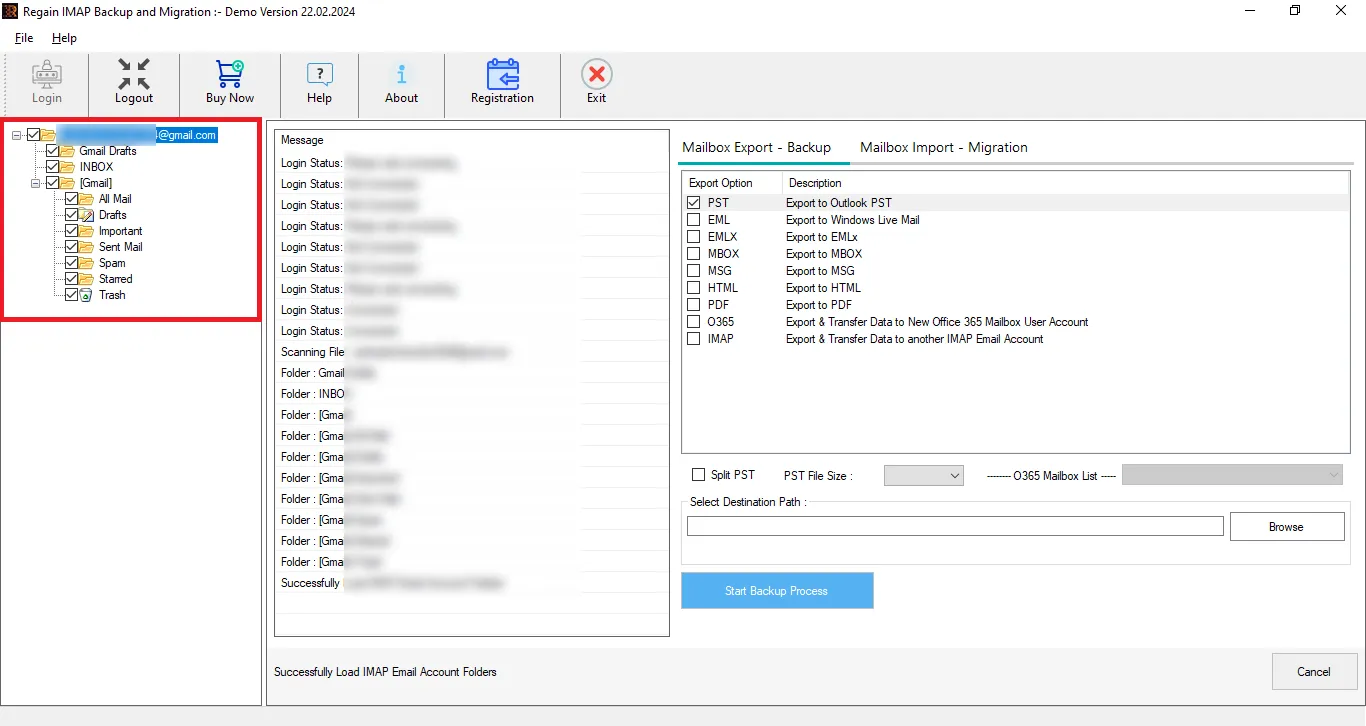
- Step 3: Software will preview the folders; here you can also deselect the folders. Then, select the file format or cloud platform/IMAP server option according to the requirements.
- Step 4: Now, enter the target account credentials for cloud migration.
- Step 5: Move accordingly, and the Postbox email export process will start.
Some Prominent Features of the Regain Postbox Converter Tool
- Regain Postbox Export Tool allows users to migrate from any IMAP account to another IMAP account (Gmail, Yahoo, Zoho, Office 365/Exchange, Outlook, etc.).
- The tool provides a preview of the mailbox before exporting, allowing users to select or deselect specific folders.
- Users will get the same email structure and folder hierarchy after migration.
- There are no size limitations of the mailbox for backup/migration.
- Backup IMAP emails to different file formats, including PST, EML, MBOX, PDF, EMLX and MSG.
- This utility supports all versions of Windows OS.
- You get a free demo version of the Regain Postbox Export Tool.
- Regain Postbox Export Tool offers free 24*7 technical support.
Closing Notes:
Exporting Postbox emails becomes necessary when anyone wants to back up their emails or switch to another email client. You can use the manual method, but it has a few drawbacks, which are mentioned above. Regain’s Postbox Export Tool makes this task very easy and efficient. This tool does not compromise on accuracy and takes you to your target result with ease. Users can also try the demo of this software for free.
Related Articles:


