

The menu bar comprises of two menus, divided into several sub-menu items, to assist users in converting Excel and CSV file to PST file. The menus are:
The File menu has three menu items: Open, Export, and Exit to help users in performing functions described below:
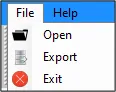
Menu Items in File Menu
| Open | Opens “Browse File” dialog to let you add Excel or CSV file |
|---|---|
| Export | Opens “Save Option” dialog to let you migrate Excel data as Contact Items or Calendar Items. |
| Exit | Closes Regain Excel to PST Converter software |
The Help Menu has three menu items: About, Buy Now, and Software Help.
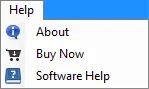
Menu Items in Help Menu:
| About | Displays Product Name, Version, support-related information, product buy webpage link, and License Information about the Regain Excel to PST Converter software. |
|---|---|
| Buy Now | Opens the Buy Regain Excel to PST Converter software webpage |
| Software Help | Displays Regain Excel to PST Converter software webpage |