

The menu bar comprises of two menus, divided into several sub-menu items, to assist users in converting OLM file data to PST file. The menus are:
The File menu has four menu items: Browse, Convert, Export to Office 365, and Exit to help users in performing functions described below:
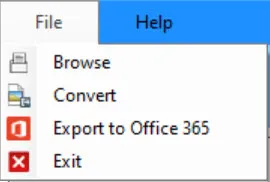
Menu Items in File Menu
| Browse | Opens “Browse file” dialog to let you add Mac Outlook OLM file. |
|---|---|
| Convert | Opens “Export Options” dialog to let you browse the destination path, select export type as PST, EML, MSG, MBOX, EMLX, RTF, HTML, MHTML, vCard, or PDF file format. Offers Split PST and Merge All Items into Single MBOX File features. |
| Export to Office 365 | Opens "Export to Office 365" dialog to migrate OLM file data to Office 365 accont. |
| Exit | Closes Regain OLM to PST Converter software |
The Help Menu has only one menu item: How to Work!

Menu Items in Help Menu:
| How to Work! | Opens the Regain OLM to PST Converter software webpage |
|---|